Looking for perfect screen capture but struggling with quality

rrmccabe

New Member
I am trying to do a video capture of my screen and get the same quality as I see on the monitors. Ideally, I would like to do all three monitors and then zoom around when I do my post editing in Adobe Premiere but can do one screen at a time if needed.

The quality is about 80% but some of the text is a little fuzzy. I am sure it will be worse when I zoom/pan in Premiere.

I am running a couple Dell U2715H monitors at 2560x1440. I have a 3rd 4K monitor but can keep that out of the equation for now.

Is it possible to get the same crisp graphics I get when viewing the monitor in person?

Appreciate any suggestions. Running a decent i9 processor, lots of RAM, SSDs and a mediocre Nvidia GTX 1650 card.

Rich
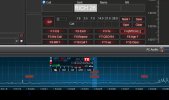
 
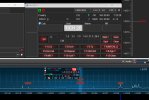
Will add a couple screen shots. The original screen and the OBX video.
 

Attachments

  • obx.jpg
    obx.jpg
    92.5 KB · Views: 139
  • real.jpg
    real.jpg
    186.3 KB · Views: 149
Is it possible to get the same crisp graphics I get when viewing the monitor in person?
Possible, but it's likely you won't be able to share anywhere this almost lossless video.

Your screenshots made at different resolution, so it is hard to say what you complain about. Anyway, I think, your most concern is chroma subsampling.

There were guide and test charts for 8-bit videos (https://obsproject.com/forum/resour...t-color-range-settings-guide-test-charts.442/).
Also, try to read about "chroma subsampling" a bit more from other sources.
 
Last edited:
Thank you. I will check out that link.

The screenshots are actually the same resolution. I just drug a larger window on one. so the poorer quality screenshot is actually what the video looks like.

Rich
 
Look at output size too - it is not match actual size of the source. Elements in "obx.jpg" is smaller than in "real.jpg".
 
Is you screenshot (named obx.jpg) was made by OBS right-click menu over the Preview window (or over the source/scene)?
 
Those screenshots were made by snagit. So there is no technical value in those images. Just to show the difference in quality.
 
And you can put all 3 monitors on one screen in Sources. I use 4 monitors, I have 2 in a Source and all 4 in a Source.
Just shrink the red lines around the image once you've set up a Source from one monitor and set up another monitor and shrink the red lines around it once you create it.
 
Back
Top