had the same problem with my r7 260.
download driver 21.3.1 and unzip with 7zip. search this file from your log "
c:\windows\system32\driverstore\filerepository\u0366969.inf_amd64_011e273f4453e6ec\b367342\amdocl64.dll
"
amdocl64.dll
and copy it to somewhere. activate administrator account on windows 10 (there are tutorials in internet) and change your user to administrator.
after done all steps and admin account is fully active, reboot your system into safe mode (how to in internet)
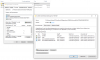
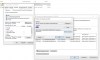
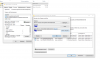
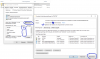
after boot in safe mode with administrator account you need to change ownership of the files from system to administrator.
edit the right from the folder and give all right to everyone. delete original file and replace with the one from 21.3.1 driver.
if the file is inserted do all back, remove given rights back to default for everyone and change ownership of folder back to system the same way. reboot and your recordings are working again.