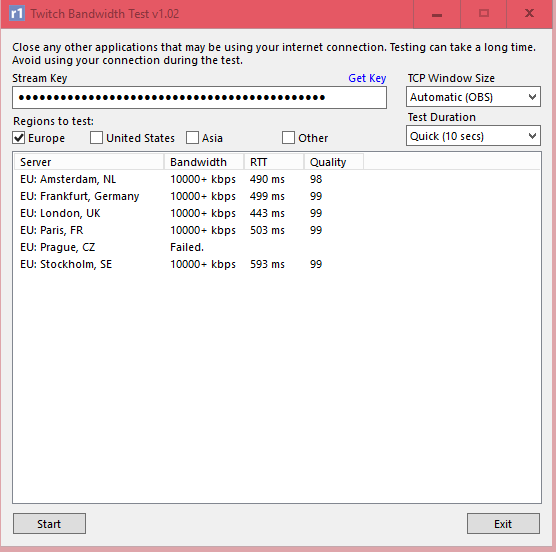
Question / Help Living in Iceland, will streaming not be "available" to me due to ping?

leFluff

New Member
So I have been trying to stream. I get no dropped frames and it seems fine but on the website it's buffering even on 1500bitrate(with my recommended bitrate at 3500...)

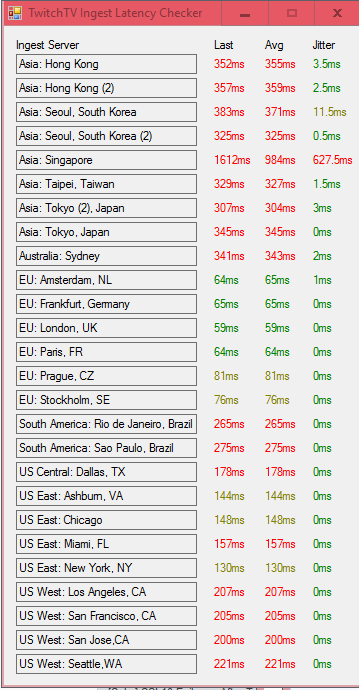
TwitchTV Ingest Latency Checker:
04b0a47c3c1be0687c12e1eb5e0b7f60.png


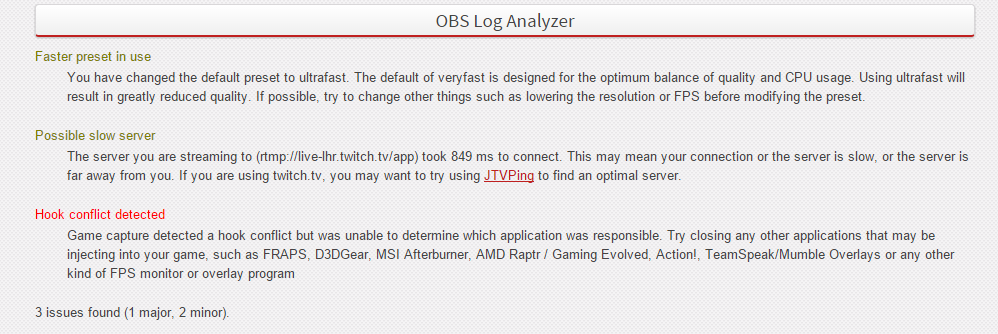
My log tells me that I connect to a slow server what ever EU server I try.
And I get a hook conflict on a hook that I have deleted? There is no hook called RzDspSrv.dll anymore.

a2459d1500c6bc94245291f3ed37ea17.png
 

Attachments

Maybe you need to reboot it to get rid of that Razer thing? OBS clearly thinks its still there.

The London server looks like the best, can you post a log where you try to stream to it for 5 minutes?
 
Maybe you need to reboot it to get rid of that Razer thing? OBS clearly thinks its still there.

The London server looks like the best, can you post a log where you try to stream to it for 5 minutes?
5d56ecd058184edf277745d19fa21655.png


The hook conflict is because of TS I suppose which I had running while I played.
 

Attachments

The length of time to connect is long but there's no dropped frames. As long as the VOD looks fine I'd say there's no problems sending to Twitch.

You have a lot of duplicated frames even on UltraFast, a Windows 10 problem maybe?
 
The length of time to connect is long but there's no dropped frames. As long as the VOD looks fine I'd say there's no problems sending to Twitch.

You have a lot of duplicated frames even on UltraFast, a Windows 10 problem maybe?
I have windows 10 yes. Is this a twitch problem then? Not enough download or something like that? Anything I can do in this situation?
 
I would solve the hook conflict (at the cost of TS overlay) and see if that helps. Other than that you might be waiting on better Windows 10 drivers. I don't think it has anything at all to do with your internet speeds.
 
I would solve the hook conflict (at the cost of TS overlay) and see if that helps. Other than that you might be waiting on better Windows 10 drivers. I don't think it has anything at all to do with your internet speeds.
Ok thanks for your input! It's not TS, it's like this even without TS.
 
@Boildown
23:04:34: Total frames encoded: 1276, total frames duplicated: 12 (0.94%)

That is certainly not much. Not even half a second worth of frames.

EDIT: Also why would stream with Ultrafast Preset and an i7-4770K ?
 
@Boildown
23:04:34: Total frames encoded: 1276, total frames duplicated: 12 (0.94%)

That is certainly not much. Not even half a second worth of frames.

EDIT: Also why would stream with Ultrafast Preset and an i7-4770K ?
Sooo what is the problem?

To your edit: I seem to get 100 fps drop on the default setting, probably some win10 thing :P
 
@Boildown
23:04:34: Total frames encoded: 1276, total frames duplicated: 12 (0.94%)

That is certainly not much. Not even half a second worth of frames.

EDIT: Also why would stream with Ultrafast Preset and an i7-4770K ?

No way a 4770k should have even that many duplicated frames on UltraFast. It should be a few hundredths of a point to zero percent. Sample size is really small though, so can't put too much stock into that result.
 
No more ideas here, maybe someone else has an idea. Otherwise wait for new Windows 10 drivers IMO. And make sure all your drivers are current. They're probably being updated extremely frequently right now.
 
Are we still talking about your original issue or the FPS issue?

So I have been trying to stream. I get no dropped frames and it seems fine but on the website it's buffering even on 1500bitrate(with my recommended bitrate at 3500...)

Buffering means that you or your viewers have a bad connection to the twitch >>content<< server.
All none partner streams that don't have enough viewers get served from San Francisco.

We have an entire topic explaining this: https://obsproject.com/forum/thread...oads-constantly-for-my-viewers-but-why.18465/

EDIT: Also duplicated frames occur when the capture source can't provide the frames fast enough. The frames need to be duplicated so that you still reach the desired FPS rate for the video encoder.

(Please hit me hard If I'm wrong here (Osiris, Jim & Co).

EDIT: I'm also a bit confused that you get no CPU capture in your log. 0.654b shouldn't be able to capture via the GPU with the latest Win 10 updates installed.

You should update to 0.655b regardless. Maybe that fixes the FPS drop that you get in your game.
 
Last edited:
Are we still talking about your original issue or the FPS issue?


Buffering means that you or your viewers have a bad connection to the twitch >>content<< server.
All none partner streams that don't have enough viewers get served from San Francisco.

We have an entire topic explaining this: https://obsproject.com/forum/thread...oads-constantly-for-my-viewers-but-why.18465/

EDIT: Also duplicated frames occur when the capture source can't provide the frames fast enough. The frames need to be duplicated so that you still reach the desired FPS rate for the video encoder.

(Please hit me hard If I'm wrong here (Osiris, Jim & Co).
So basically I can't do anything and just won't be able to stream unless they are in SF area?
 
Not everyone is having that issue.
You would have to ask your viewers if they have issues or not.

I for example can watch 1500er streams fine from germany.
But using 1500 Kbps in combination with Ultrafast would cause unwatchable quality. (Image Quality not buffering)
 
Not everyone is having that issue.
You would have to ask your viewers if they have issues or not.

I for example can watch 1500er streams fine from germany.
But using 1500 Kbps in combination with Ultrafast would cause unwatchable quality. (Image Quality not buffering)
I can too from Iceland, the only stream buffering for me is my own. I have 0.655b but the log posted was outdated since it took a bit to get answered :P.
 
Back
Top