You are using an out of date browser. It may not display this or other websites correctly.
You should upgrade or use an alternative browser.
You should upgrade or use an alternative browser.
Live stream AND record live stream video at the same time?
- Thread starter gmrsradio
- Start date
Umm. Yes. Just click both buttons.
Each destination could have completely different settings, if you have the processing power to encode it twice, or you could have the recording share the stream encoder, which basically just dumps a bit-wise copy of the live stream into a file and calls it good.
Each destination could have completely different settings, if you have the processing power to encode it twice, or you could have the recording share the stream encoder, which basically just dumps a bit-wise copy of the live stream into a file and calls it good.
Ok, I think I found it under setting then output
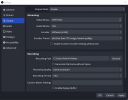
I made the adjustments and I will post screenshot for others who may come across this thread
I think this is the best setting for the lowest CPU usage, if not please let me know
thanks
I made the adjustments and I will post screenshot for others who may come across this thread
I think this is the best setting for the lowest CPU usage, if not please let me know
thanks