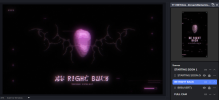
So I have recently set up multi streaming in OBS and I have come across a strange problem.
I am using the stream elements version of OBS which allows me to multi stream as well as use multiple different canvases. In my case that is one 16:9 canvas for Twitch and one vertical canvas for TikTok live.
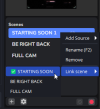
The issue is, when using a feature that allows you to link scenes together (linking horizontal scenes with vertical ones) they don't switch together and I have to change them manually.
Maybe I am not completely understanding what the link feature does but from what I understand that is what it should do.
I am using the stream elements version of OBS which allows me to multi stream as well as use multiple different canvases. In my case that is one 16:9 canvas for Twitch and one vertical canvas for TikTok live.
The issue is, when using a feature that allows you to link scenes together (linking horizontal scenes with vertical ones) they don't switch together and I have to change them manually.
Maybe I am not completely understanding what the link feature does but from what I understand that is what it should do.