Question / Help Laptop OBS not working at all after working perfectly for months.

Topdeck99

New Member
Preface. I am using a Laptop and can supply any system info or logs as required. I have checked almost every forum post on my various issues and no solution has been helpful. (especially the main laptop blackscreen one.)

Note. Everything with obs on the same laptop has worked perfectly with no problems until yesterday.

Windows capture and game capture have been finicky.
Webcam works perfectly

Main problem is that now monitor capture is totally useless. Screen shows but images become partial when moved. And when I move windows they often leave behind clone window images over the screen and windows disappear all together. This all makes window capture totally useless.

All help would be appreciated and I can supply or communicate anything as needed.
 
switchable graphics do not work well with OBS because OBS requires you to let it know which card (GPU) that it can hook the scene from. so if monitor capture is working, game, window, or even webcam might not. this is by design and sucks for OBS users but you basically have to pick between using monitor capture and anything else.

if you are using monitor capture (and nothing else) dont do the nvidia trick to add OBS to nvidia control panel
if you are not using monitor capture, but instead using game, window or webcam capture, do the steps provided here:
https://obsproject.com/forum/threads/laptop-black-screen-when-capturing-read-here-first.5965/
 
Supplying a break down of the problems and specific modes.
First I want to restate that for months of using obs on this same switchable graphics laptop I had zero problems and did not have to fiddle with Nvidia at all. There 100% should be a reason for that and why problems suddenly began to occur.

Post Errors.
I tried the options on both setting OBS through nvidia to run on either integrated graphics or auto-select(which puts in on nvidia).

1. Monitor Capture on integrated graphics works but trying to stream (example) the in game full screen client of League of Legends shows a black screen only with the cursor.

2. Similarly on integrated graphics attempt to use window and game capture fail to show the full screen in game client.

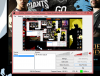
3. While auto selected to use nvidia graphics cards, monitor capture fails to work properly and functions like I mentioned in OP. Windows are choppy and when moved create ghost windows or don't show up at all. Ex OBS in my first picture.

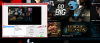
4. The most troubling problem (which I was not able to replicate for a screen shot) is that when using nvidia graphics for windows capture and game capture, windows capture presents a problem sometimes where for example in my second picture when my windows capture is the LoL client. Sometimes the image will freeze on what its currently on, for example the stream will show the window on the main screen, while in reality I am moving to other screens and menus etc. It will show my cursor movements but only the original screen will remain. Also sometimes the window will also just go transparent and the window cutout will only show the background behind the client, without any settings having been changed. Picture attached to show the window capture.
 

Attachments

  • monitor capture.png
    monitor capture.png
    389.8 KB · Views: 27
  • window capture.png
    window capture.png
    883.1 KB · Views: 28
Is seriously no one going to reply? Mod please? wtf?
First, I responded and explained this you.
Issues 1-3 are things that that are the nature of switchable graphics. so I dont know what you mean by this just started happening. Unless you just recently updated your drivers, I have no clue. either way, issues 1-3 are understood and the thread below was stickied for these very issues:
https://obsproject.com/forum/threads/laptop-black-screen-when-capturing-read-here-first.5965/

issues 4: your graphics settings are way to high for your setup((1080@50), 1080@30 is actually probably still to high. mobile i7's dont perform like their desktop counterparts.
Code:
Total frames encoded: 18564, total frames duplicated: 4106 (22.12%)
Number of frames skipped due to encoder lag: 986 (5.31%)
Total frames rendered: 16394, number of late frames: 1172 (7.15%)

duplicate frames needs to be below 1%, you are at 22%. so when OBS actually gets a picture, your CPU will choke.
Encoder lag needs to be at 0%.
late frames usually has to do with ti high of bit-rate, but I will chalk that up the above two issues.

Reduce to 720@30 unless local recording only.


Other thoughts:

1.Only game capture will work with full screen games,
2. League of Legions is a special game as it has separate scenes for the main window and the actual game. scene switcher is built in to OBS now and will need to be used with LoL.
3. If you did setup the nVidia Control panel with the correct version of OBS (there are two locations btw), then monitor capture shouldn't work at all.
 
Back
Top