thirdvalve
Member
How do I use the laptop camera as a source? I want to be able to show a video, then go to a live session with input from the laptop camera and mic.
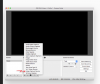
In the documentation it shows a popup menu with a list of courses, by right clicking on the bottom of "Scene" or "Sources"....
... but when I do this, I do not get a list of input sources. It just prompts me for the name of a new scene or source. The list as shown in my 2nd attachment is missing.
What am I doing wrong?
In the documentation it shows a popup menu with a list of courses, by right clicking on the bottom of "Scene" or "Sources"....
... but when I do this, I do not get a list of input sources. It just prompts me for the name of a new scene or source. The list as shown in my 2nd attachment is missing.
What am I doing wrong?