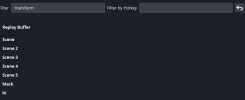
keybind for flipping??

PiePeople

New Member
This is kind of my first time posting this
Dont even hate but..
Wheres the keybind for flipping horizontal and vertical? im using OBS 32.0.1
 

Attachments

  • Captura de tela 2026-01-09 180249.png
    Captura de tela 2026-01-09 180249.png
    12.1 KB · Views: 8
What are you trying to do? Switch a camera source between landscape and portrait mode (90 degree change)? Flip an image horizontally or vertically (180 degree change)?

The simplest method to do either type in OBS would be to define a scene for each layout, with each scene containing the camera as a source. Then right-click the camera source in a scene and select "Transform" There will be options for rotate and flip. Resize the camera sources in the scene as desired.

During your presentation, select the scene that has the camera formatting you want.

You can assign hot keys to each scene to switch between them.

 
im talking about flipping keybindand im talking about flipping an image too
Learn streamerbot. Not that hard. Flipping images is in the OBS tabs. Otherwise, just use Move Transition and set 0ms to your Move Sources filter with two transformed-saved settings with the image regular and flipped.

....learn streamerbot.
 
Back
Top