No AT&T fiber in our area either.I have them out here all the time cleaning up noise in the neighborhood so I can at least even get my 20 up!
You are using an out of date browser. It may not display this or other websites correctly.
You should upgrade or use an alternative browser.
You should upgrade or use an alternative browser.
Just trying to figure out why my streams keep crashing.
- Thread starter John Zapf
- Start date
So I got these errors again this morning on one of the streams. Really need to figure out what's going on with this it says had an error trying to connect to this stream or something. The stream has been going for a couple of days it it's not trying to connect to the stream. The Internet didn't go down period two other streams did not stop. The camera did not stop. I don't understand what is going on. And also I now pay $300 a month for 30MB up, so the internet is not an issue anymore.Just trying to figure out why my streams keep crashing I've included the error messages and the only log file I can find there was not a crash report.
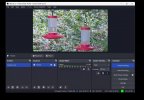
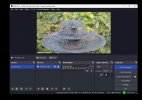
Streams are running on a dedicated windows machine nothing but the three streams are running. I have tailored all bandwidth as much as I could. CPU is running around 30% GPU runs around 60%.
Thanks.
Attachments
Well lots of issues again today. Lots of issues! I am an IT guy of 33 years, my network is fine. this stream HAS NEVER GONE DOWN TILL I STARTED USING OBS. CAN SOMEONE PLEASE HELP!
Attachments



PaiSand
Active Member
The only issues shown on the log file are HAGS and that you're using the wrong YUV color space.
 obsproject.com
And an error I have no idea what it is.
obsproject.com
And an error I have no idea what it is.
Doing a simple search found that the error (os_process_pipe_write for info structure failed) leads to this thread with a probable cause and solution:
Analyzer | OBS
OBS (Open Broadcaster Software) is free and open source software for video recording and live streaming. Stream to Twitch, YouTube and many other providers or record your own videos with high quality H264 / AAC encoding.
obsproject.com
Doing a simple search found that the error (os_process_pipe_write for info structure failed) leads to this thread with a probable cause and solution:
Question / Help - Recording error "An unspecified error occurred while recording"
I'm having a problem recording with OBS (streaming works). I get an error message "An unspecified error occurred while recording" and when i check the logs i get [ffmpeg muxer: 'adv_file_output'] os_process_pipe_write for info structure failed. I tried a few solutions but nothing works: - 32...
obsproject.com
not sure about the color space all that is set to the default setting and auto. The cameras live stream have no color space setting.The only issues shown on the log file are HAGS and that you're using the wrong YUV color space.
And an error I have no idea what it is.Analyzer | OBS
OBS (Open Broadcaster Software) is free and open source software for video recording and live streaming. Stream to Twitch, YouTube and many other providers or record your own videos with high quality H264 / AAC encoding.
Doing a simple search found that the error (os_process_pipe_write for info structure failed) leads to this thread with a probable cause and solution:
Question / Help - Recording error "An unspecified error occurred while recording"
I'm having a problem recording with OBS (streaming works). I get an error message "An unspecified error occurred while recording" and when i check the logs i get [ffmpeg muxer: 'adv_file_output'] os_process_pipe_write for info structure failed. I tried a few solutions but nothing works: - 32...obsproject.com
As far as the URL's are to check the stream I cannot check my streams coming from the camera on that URL my streams are all internal before they leave. My cameras aren't accessible from and outside network.
Lawrence_SoCal
Active Member
This looks like a Settings mistake in OBSSo I got these errors again this morning on one of the streams. Really need to figure out what's going on with this it says had an error trying to connect to this stream or something. The stream has been going for a couple of days it it's not trying to connect to the stream. The Internet didn't go down period two other streams did not stop. The camera did not stop. I don't understand what is going on. And also I now pay $300 a month for 30MB up, so the internet is not an issue anymore.
08:28:37.546: YUV mode: Rec. 709/Full
As for Cox, even though 'business service' you are on coax, not fiber, right? Did you not get the email recently?
Your internet is picking up speed
Great news! As a gift, we've increased your upload speeds from 10 Mbps to 50 Mbps at no additional cost. Your new speeds are already available, so enjoy! Thanks for being part of the Cox family.
discussion regarding upload speed increases (thanks to internet connection competition from T-Mobile and Verizon) https://www.dslreports.com/forum/coxhsiAs for business service, and 8 IPs. Are you getting 20 mb/s each, or total? I'm assuming total (as controlled by DOCSIS channels).
With your experience, you probably already know, but we all know what 'assume' stands for, so in the case of the obvious
- you are leaving sufficient unused/buffer space for TCP ack packets, etc on the upload bandwidth?
What are you doing for real-time hardware resource utilization monitoring (PC, LAN, and WAN link)?
I'm suspecting using that YUV color space setting is overwhelming GPU or CPU (or both) causing rendering issues with camera feed, then crashes... but I of course could be completely wrong
Lawrence_SoCal
Active Member
And you may want to research further on
10:25:31.894: [Media Source 'Feeder']: settings:
10:25:31.894: input: rtsp://root:..snip...@10.0.0.31/axis-media/media.amp?streamprofile=livestream
10:25:31.894: input_format:
10:25:31.894: speed: 100
Speed = 100 - that seems ... odd
though honestly, I don't know exactly what speed that is referring to, but I'd think i might be fps, and should match your camera settings
Another thing to consider is the compression codec used from cameras to OBS PC. HEVC is more highly compressed and therefore takes (a lot?) more computational to compress, and a little more to de-compress/decode. Assuming local LAN bandwidth isn't an issue, using lower compression rates (ex H.264) might help?? maybe.. but also depends on camera codecs and which are better optimized... crap shoot, especially on lower-end security cameras
Moving onto wild guesses (and nothing more). If the cameras are not providing a stable enough feed (jitter/latency, etc) for OBS, maybe (and no idea if this would help at all) maybe some automation to disable and re-enable camera sources at regular intervals (once an hour, for a few seconds)... With Advanced Scene Switcher, I believe you could do that within OBS. I'm sure with scripting you could probably do somethign at camera level. and no idea if this is an issue at all.
Start with resetting YUV Space to a default setting, and try again.
10:25:31.894: [Media Source 'Feeder']: settings:
10:25:31.894: input: rtsp://root:..snip...@10.0.0.31/axis-media/media.amp?streamprofile=livestream
10:25:31.894: input_format:
10:25:31.894: speed: 100
Speed = 100 - that seems ... odd
though honestly, I don't know exactly what speed that is referring to, but I'd think i might be fps, and should match your camera settings
Another thing to consider is the compression codec used from cameras to OBS PC. HEVC is more highly compressed and therefore takes (a lot?) more computational to compress, and a little more to de-compress/decode. Assuming local LAN bandwidth isn't an issue, using lower compression rates (ex H.264) might help?? maybe.. but also depends on camera codecs and which are better optimized... crap shoot, especially on lower-end security cameras
Moving onto wild guesses (and nothing more). If the cameras are not providing a stable enough feed (jitter/latency, etc) for OBS, maybe (and no idea if this would help at all) maybe some automation to disable and re-enable camera sources at regular intervals (once an hour, for a few seconds)... With Advanced Scene Switcher, I believe you could do that within OBS. I'm sure with scripting you could probably do somethign at camera level. and no idea if this is an issue at all.
Start with resetting YUV Space to a default setting, and try again.
Thank you for the feedback.And you may want to research further on
10:25:31.894: [Media Source 'Feeder']: settings:
10:25:31.894: input: rtsp://root:..snip...@10.0.0.31/axis-media/media.amp?streamprofile=livestream
10:25:31.894: input_format:
10:25:31.894: speed: 100
Speed = 100 - that seems ... odd
though honestly, I don't know exactly what speed that is referring to, but I'd think i might be fps, and should match your camera settings
Another thing to consider is the compression codec used from cameras to OBS PC. HEVC is more highly compressed and therefore takes (a lot?) more computational to compress, and a little more to de-compress/decode. Assuming local LAN bandwidth isn't an issue, using lower compression rates (ex H.264) might help?? maybe.. but also depends on camera codecs and which are better optimized... crap shoot, especially on lower-end security cameras
Moving onto wild guesses (and nothing more). If the cameras are not providing a stable enough feed (jitter/latency, etc) for OBS, maybe (and no idea if this would help at all) maybe some automation to disable and re-enable camera sources at regular intervals (once an hour, for a few seconds)... With Advanced Scene Switcher, I believe you could do that within OBS. I'm sure with scripting you could probably do something at camera level. and no idea if this is an issue at all.
Start with resetting YUV Space to a default setting, and try again.
Yes I set the color space back to default on OBS. Cameras don't have any color settings on them.
The most output I can get here on my Cox business connection is 30 megabits up so I just made the upgrade to that.
As far as the cameras the stream is very stable from them. The bit rate goes down a little bit at night when IR comes on and then throughout the day it goes up and down depending on the movement and the cameras. But they're hardwired Poe right to a Cisco switch here in the office. I used to be on H264 with Cam streamer and the image wasn't as clear but Cam streamer streaming directly from the camera to YouTube the cameras never went down even one time until I did a firmware update or something but they never went down they would stream solid for a year straight without an issue.
I tailor the cameras really well to keep the data in check I use something built into the cameras from axis called zip stream and then they also have compression I control the camera profiles and watch them very closely to make sure the data coming into obs is just perfect amount so it doesn't have to work hard at all. And I'm fully aware of the data coming in to oops as I've been doing this a long time and I know for an example the fountain stream has a lot of movement and that camera wants to put out 80 megabits per second, so I have to compress for sure. But zip stream works very well and then I have regular compression also.
But the two reasons I switched to obs is I wanted to stream H.265 on HLS, Cam streamers still having a bit of an issue with that. And I wanted to do a picture in a picture and some overlays like I do on my mainstream.
Like I said I just purchased a new server a poweredge 740 and I have a really beefy video card in there so I'm going to switch everything over soon from my test computer to that server and hopefully things will never go down again.
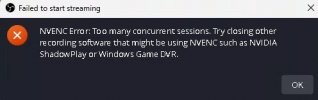
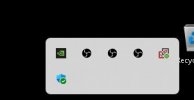
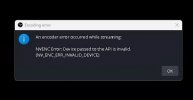
And then after I closed the three streams and tried to restart them I got this error. and when I looked in the system tray there was 3 instances running and yet I couldn't stop them and everything was closed so when I was starting new streams it was multiplying them all of a sudden there was four streams and five streams and six streams in the system tray. I actually had to reboot the computer to get things cleared up not a good thing. This computer/server is dedicated to BS I shouldn't have to mess with it ever. there is no crash report.