Question / Help Is my laptop capable of streaming at all?

Segastar

New Member
Hello,

I bought myself a Lenovo z40 laptop for christmas and i was interested in doing some streaming, mostly consoles like Wii U and Switch. I recently purchased an Avermedia Live Gamer Portable 2 and I have been having a lot of issues with recording and the preview screen in OBS being very choppy and lagging hard. I've done practice streams and the quality there is ok but something is still telling me that there is a problem somewhere so im coming here for help.

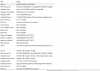
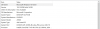
I have included specs of my laptop. Ive had friends who stream tell me this laptop is more than capable of handling some streaming so I would just like to know what the issue is. I have also heard people say the lgp2 is a more cpu heavy card then something like the Elgato. Any help is super appreciated!
 

Attachments

  • Specs 1.PNG
    Specs 1.PNG
    27.1 KB · Views: 36
  • Specs 2.PNG
    Specs 2.PNG
    60.6 KB · Views: 51
An elgato is definetly one of the more favored capture cards when it comes to price and quality. Your pc can stream. Try streaming at 720p 30fps 2000 bit rate with cbr enabled, cpu preset on fast, and use the software x264 not the nvenc. Nvenc is not great for streaming at the moment. So keep your base resolution at 1080p but bring your scaled resolution down to 720. Also don’t use a custom buffer size. A lot of times when it comes to streaming you just have to play around with your settings to find your pc and bandwidth sweet spot. Once you change settings make sure to restart obs. If after messing with settings and still it looks choppy it might be the hardware, it could have a defective cord or anything as such. But your pc is capable of streaming.
 
Thanks for getting back to me.

Like i said i did do some test streams, video quality seems fine....its just tough to record and stuff, comes out real bad. It's hard to describe, the preview screen sometimes drags like 3-4 seconds or more behind and then audio is off I will give these settings a try. If worse comes to worse, i'll send the LGP2 back and get one of the Elgato cards.
 
Thanks for getting back to me.

Like i said i did do some test streams, video quality seems fine....its just tough to record and stuff, comes out real bad. It's hard to describe, the preview screen sometimes drags like 3-4 seconds or more behind and then audio is off I will give these settings a try. If worse comes to worse, i'll send the LGP2 back and get one of the Elgato cards.


If your just trying to record use nvenc. It’s best for local recording. Your obs screen will always be delayed a little (normally 1-3 seconds) depending on your pc. So that’s normal to be a little behind. As for your audio you’ll have to sync it with your video yourself. So when your in game record yourself completing actions and follow those actions with voice such as if you were to turn left you say “left” and try to count the delay between when the action happens and you hear your voice. Then in your obs settings you will go to the settings cog next to the mic/auxiliary and change that in milliseconds. Then after finding the right delay for your mic audio you will put the same quantity in milliseconds for your game audio in obs so everything is synced properly. (There’s 1000 milliseconds to equal 1 second so your aware.) my old computer was 1300 milliseconds behind my actual gameplay so i just put that in there and it came out okay.
 
Back
Top