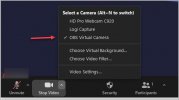
Hello All - Anyone knows what steps I should take to have Zoom see my PTZ cameras registered in OBS? I only see OBS Virtual Camera and nothing else. What should I do? Please send help.
SpartanVoip
I found the solution - Steps are simple:
In OBS Studio after adding your cameras and the OBS Virtual Camera
1. Click the GEAR (settings) next to the OBS Virtual Camera in OBS
2. Select Output Type as Source and Output Selection as the Camera (in my case HD Pro Webcam) - click ok to save
3. Now Click to Start OBS Virtual Camera
In ZOOM
4. Configure the Video Settings
5. Select the OBS Virtual Camera
Done
Now you can use OBS to control the camera in ZOOM. This is excellent for PTZ Cameras
Thanks
This site uses cookies to help personalise content, tailor your experience and to keep you logged in if you register.
By continuing to use this site, you are consenting to our use of cookies.