Question / Help In-Game Audio Can Not Be Heard

DarthJawaTheMad

New Member
I'm streaming Fortnite on a Windows 10 PC. My speaking voice through the microphone in my headphones can be heard fine on the stream, and I can hear the in-game sounds in my headphones, but the in-game sounds are not being heard by people who are watching/listening to the stream. I can't figure out what I'm doing wrong.
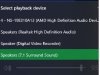
 
My headphones are the default sound system on my computer. These are my sound options on my PC.
 

Attachments

  • Speakers.jpg
    Speakers.jpg
    54.2 KB · Views: 66
I use my headphones for both sound and microphone. I tried changing "Default" in the audio settings specifically to the microphone on the headphones and the speakers on the headphones. Now you can hear, very low, the loudest sounds in the game (gunshots and explosions). You still can hear my voice just fine. I have both of them turned up as high as they go on my broadcasting dashboard. I don't know what else to do.


I've tried some of the other things I've found online, like unchecking boxes 2 - 5 in the advanced settings. Nothing works. And now something happened where when I stream it's just a black screen. I've had this sound problem with the Twitch software and the XSplit software as well, so it's obviously the headphones, which I'm not going to replace, so I wasted a whole afternoon on nothing.
 
Well, I ended up figuring out the in-game sound issue but then when I tried to put my computer monitor as a video source I get this weird thing that is a screen within a screen within a screen within a screen going on forever.
 
Back
Top