I'm stuck !

ragrati

New Member
Hi,
I bought a new PC
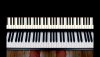
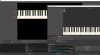
I created something quite precise with OBS (no stream), like you see one the picture
So, I have precisely defined the contours of the window captures, software.
For example, to align the camera's piano keys with the virtual keyboard

But on the new PC i don't find again all this
I exported the profil, but nothing
It took me a lot of work to get this rendering for my 200 videos

How to do for the new computer ?
Thank you
 

Attachments

  • Sans titre-1.jpg
    Sans titre-1.jpg
    672.2 KB · Views: 42
  • 28 days_Render_RealTrack_Bass.00_00_04_11.Still002.jpg
    28 days_Render_RealTrack_Bass.00_00_04_11.Still002.jpg
    423 KB · Views: 35
Profiles store settings like canvas size, bitrate, framerate, and streaming service.
Scene Collections store the scenes. Export those and import them on the new system.

You can also copy the contents of %APPDATA%\obs-studio\basic from the old machine to the new machine, that's where OBS stores all of its scenes/profiles/configs.
 
thank you, but I did it and I see nothing on the new PC
No canvas etc
BUT
I only tried with one software
I don't see the right canvas
 
As FerretBomb explained:

Export your scene collection (top menu of the running obs-studio on your old machine), transfer it by usb-stick or disk to the new machine then. Afterwards import it there (top menu of the running obs-stuio on your new machine). Look into the scene collection menu at top again and change over to the freshly imported scene collection.

You should see instantly your usual scenes on the lower left.

By the way: Your scene collection on the old machine currently doesn't have a name. Currently its named "sans nom".
 
Not essentially, but you should recognize your (possibly different) scene collections.
Can you give short feedback if you could transfer your scenes work sucessfully?
 
So you should upload here in the forum a screenshot of your complete obs window, please. If possible, with a screenshot of the list provided in the top menu where the scene collections are listed.
 
At least the sources in your scene are now there!!

You must check now - source after source - why they don't show up. In case of pictures it may simply be the fact, that these pictures (files) are missing. You have to transfer them to the new computer as well...

In case of window capture there must be the same program windows to be opened actually (otherwise there is nothing to be captured). And in case of video sources you have to check if the right sources (like usb cameras aso.) are available to the new computer now as well.
 
Thank you
in fact here is the thing : I 'm changing machine, i'm waiting it
BUT,I tried with a laptop to see if I found back my sources

But on my laptop nothing is installed, but what I don't get is why I don't see the crops (canvas ? I'm french)
For example : synthesia :I installed it on the laptop but I don"t have the right crop

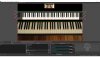
I show you how it should be

Then , I don't understand differences between sources and scenes
 

Attachments

  • Sans titre-1.jpg
    Sans titre-1.jpg
    454.1 KB · Views: 18
Okay.

The crops (or canvas) of single sources you often see only, if the source is available right now.
This means that you must activate (click) on the source name in the sources list and the source being available this time to OBS to see the red borders. Is this what you meant?

One thing more: Assure that under Settings->Video (Parametres...) the same global canvas size is set on the new machine like those size on the old machine...

Regarding the difference between sources and scenes:
Sources are all things that OBS can input or import and handle in realtime: Pictures, live video feed, pre-recorded files, and so on.

A single scene contains (as you know: possibly multiple) sources. To be exact: Those sources that should be visible at same time (on your output/program).
The scene memory stores information how you arranged those sources: position, size, crop, and so on. You know...

Hence you can have multiple scenes and switch between them. Having another scene does mean you can have different arrangement of (the same or other) sources.
For instance to toggle between live piano view and a (prepared) sheet notes alternatively.

The scene collection is the collection of all your scenes together.

I don't know if there is a french translation to help you better.
 
Last edited:
Thank you for helping
Here is the thing : i'm gone change computer, then change license so I will lose everything
How to be sure that I will recover the sources ?
I save Profil, scenes and I pray that i will be able to find the same crops ?
Is the webcam configuration saved as well ?
What do you mean : One thing more: Assure that under Settings->Video (Parametres...) the same global canvas size is set on the new machine like those size on the old machine...
 
Back
Top