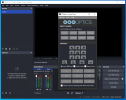
I made the mistake of updating OBS to version 32 - how I wish I hadn't because it removed my PTZ Optics controls and now I'm having massive trouble r

Brookers55

New Member
I made the mistake of updating OBS to version 32 - how I wish I hadn't because it removed my PTZ Optics controls and now I'm having massive trouble reinstalling them. Why oh why when OBS is updated do vital parts of previous installations get removed? It's amateurish. Can this problem be sorted for future updates? I'm always dubious about updating OBS for this very reason - it causes more problems than it's worth.
Have you got a step by step guide to reinstalling this important plu-in.
 
You can try reinstalling the previous OBS version you were using.
If you have issues with a third party plugin you should contact its dev (and other users) via the Discussion section on the particular plugins' page or wherever the dev have set for this.
 
You can try reinstalling the previous OBS version you were using.
If you have issues with a third party plugin you should contact its dev (and other users) via the Discussion section on the particular plugins' page or wherever the dev have set for this.
PaiSand thanks for that advice. I have reverted to version 30.2.3 on my home laptop and successfully installed the PTZ plug-in. I will attempt the same on our church laptop after tomorrow's service. It's a warning to me to NEVER EVER upgrade OBS EVER again. There's no point if the developers don't test at least all the popular plug-ins work properly before unleashing new versions onto the web. We users should not be expected to go through the pain of reinstalling plug-ins and then finding they don't work with new versions of OBS - it's a very amateurish way of launching software. I understand from the forum that many others are having the same problem some time after the release of the new version of OBS. Why has it not been withdrawn yet for further testing?
 
OBS devs don't have to test third party plugins. Most popular plugins may not be the ones you use.
OBS devs made available beta and release candidate versions of the software so you can test it before committing to update, and so the third party plugin devs can make sure their plugins work as intended.
If then you don't verify anything and things stop working, isn't any devs fault.
 
PaiSand thanks for that advice. I have reverted to version 30.2.3 on my home laptop and successfully installed the PTZ plug-in. I will attempt the same on our church laptop after tomorrow's service. It's a warning to me to NEVER EVER upgrade OBS EVER again. There's no point if the developers don't test at least all the popular plug-ins work properly before unleashing new versions onto the web. We users should not be expected to go through the pain of reinstalling plug-ins and then finding they don't work with new versions of OBS - it's a very amateurish way of launching software. I understand from the forum that many others are having the same problem some time after the release of the new version of OBS. Why has it not been withdrawn yet for further testing?
I had the exact same issue, lost 4 cameras and spent yesterday and today at the church to get them back online. I had to manually update all the plugin- ins that i used, and other stuff. I did get the cellphone cams back and finally the NDI PTZ. Unfortunately, now have to load up and use the PTZ web browser on a 3rd monitor to control the PTZ cams, and its terrible and slow, verses the obs ptz controls plugin. it needs to be updated by its owner to work on this new version, i sent him a FYI. I also even crashed the new version of OBS 3 times, in trying to get the NDI cam to work.

But i must say for free software and the many hours that many volunteers have spent in coding it. Thank You!

I am new to streaming and obs (6 months now) and am very surprised as to why OBS does not has a generic built in PTZ camera support, instead of relying on the third party plugins. As i notice a trend that the ptz bulders, are now pushing folks to use their video switchers over software, like OBS. In searching OBs in tryting to find a work around, found a few, but looking at the updates date they're quite old, and wondered if they would have same issue.
 
My $0.02 ...
1. those of us who set up OBS Studio with a PTZ camera are in a small minority of OBS Studio user population.
2. That OBS Studio does not test 3rd party plugins is well-known for MANY years. It is a user error to think otherwise.
3. There are some standards [Sony's VISCA over IP], but there are different dialects per camera mfg.
and then the big issue is there are any license/patent issues involved that preclude free, open-source software from using (why NDI isn't native, which I'd think is way more valuable than PTZ controls)

There is the well-known plugin, but you might also want to check out PTZ Optics and their PTZ controller (incl free OBS Studio related control s/w). But cheap, asian cameras with poorly written firmware... yea, good luck with those, they will likely always be a challenge (problem).

As for OBS Studio upgrade... always read the release notes first. Then, have a system backup, and a rollback plan one has confidence will work, before doing upgrades on mission critical systems..
 
Hello Everyone: I run the live stream operation for a church on Vancouver Island, BC, and we are also dependent on the PTZ Controls plugin. I installed OBS Studio 32.2.1 on a home/test computer, and received the same error message that others are seeing with regard to the PTZ Controls plugin. So I am holding off updating the church/live stream computer until this is resolved.

I don't have a solution for anyone who has already updated OBS, and is stymied with regard to controlling their PTZ cameras. I have updated OBS in the past and found incompatibilities with plugins which caused me grief and extra work to find alternatives. But in the current situation, with OBS Studio 32.2.1, here some things that I would try:
  • Reinstall the previous version of OBS Studio that was working with the PTZ Controls plugin.
  • For the PTZ cameras that we use (2 X Datavideo PTC 140NDI) there is a browser user interface that includes that ability to control the cameras.
  • Our cameras are NDI compliant, and NDI Tools/Studio Monitor includes the ability to pan, tilt and zoom the cameras.
  • The manufacturer (Datavideo) has a camera utility, which I have never been able to figure out, but if I could get it working, it would control the cameras.
  • Possibly the PTZ Optics utility that @Lawrence_SoCal mentions.
I hope all this is not stating the obvious, and none of these suggestions are ideal, but in my case I believe one of these options would get me by until a permanent fix would be available.

Good luck to everyone - I like to stay current with OBS releases, so I will be looking forward to more developments on this.

Regards. . .
 
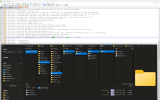
Plenty of posts but not a single log file... if the plugin isn't loading, your log should say why.

FWIW, I tested on a clean 32.2.1 install and it loads fine:
 

Attachments

  • 1785720084270.png
    1785720084270.png
    175.4 KB · Views: 11
Last edited:
Hello @PaiSand : Thank you for your suggestion to contact the developer when a plugin is generating errors. However, in this case a) the developer has been contacted, but has not responded, and b) what has changed is OBS Studio, not the plugin. So in my opinion it is reasonable to open a general support post for this circumstance.

Regards. . .

Tony N.
 
Based on that screenshot, it looks like the developer is distributing non-standard Qt components (Qt6SerialPort), this will always be a risk as OBS is free to update its Qt version at any time, plugins are not supposed to depend on it. If the developer has abandoned the plugin, finding a 6.11.1 compatible version of Qt6SerialPort might work around it.
 
I rolled back OBS to version 3.1.2 to get the PTZ controls back and was quite surprised at how easy it was and how all the plugins worked just fine. I thought rolling back would be troublesome and require same for each plugin in.

Big salute and Hats off to the designers who thought of this.

Just had to re select the NDI input, and add it to the ptz controls presets, change the tcp port number to match same in PTZ, then add 5 new scenes that load the ndi and ptz conrol action presets for that scene and audio., All ok and back to normal, by selecting the scence the ptz auto moves to the cameras view I want, in the preview window. One button operation.

I did one thing extra, in the OBS setting i uncheked the box "check for updates" as other folks wil be using this computer, and i dont want them to upgrade accidentaly until all the plugins work are sure to work, saves a headache and time.
 
Back
Top