I have a problem with the quialities!

NatBronx437

New Member
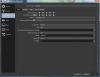
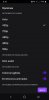
For a better performance I transmit at 432p with 30 fps but when my stream starts, Twitch tells me that I have qualities in 480/720 / 432p60fps.
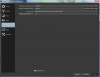
And this is wrong, I do not understand why it gives me those qualities when they are not activated in OBS, this began to happen since that hack days ago.

Does anyone know how I can fix it? (I speak Spanish, if you could explain me in an understandable way I would appreciate it)
 

Attachments

  • Screenshot_1.png
    Screenshot_1.png
    95.2 KB · Views: 37
  • Screenshot_2.png
    Screenshot_2.png
    107.3 KB · Views: 37
The quality listing does not say 432p60, just 432p.

720p and 480p are the default transcode sizes. They will always be there if you have quality options (transcodes), no matter what size stream you are sending.

I do have to ask, why are you streaming at 432p? That's very non-standard. You're downscaling from 720p. Normally you would scale to 480p or 360p.
 
The quality listing does not say 432p60, just 432p.

720p and 480p are the default transcode sizes. They will always be there if you have quality options (transcodes), no matter what size stream you are sending.

I do have to ask, why are you streaming at 432p? That's very non-standard. You're downscaling from 720p. Normally you would scale to 480p or 360p.

In that image it appears like this, it makes transmissions in 432p for the same thing that I say, my PC is not good, I cannot transmit more than 480p because the audio is heard cut or already speaking well, it is not heard, better to lower the quality of the stream.


There is nothing wrong with streaming like this, countless streamers have 540p/630p quality

As I said, I cannot transmit in 480 for the audio, and 360 looks bad and even going to the 360 option that error happens that never happened to me, the top quality was 432 and that's it.

Sorry if it seems like I speak badly, but it really is frustrating xd
 
Back
Top