
I can't install OBS Studio bc of an error

PJ Kriaras

New Member
So every time I use the installer it keeps saying "OBS Files are being used by the following application: Microsoft Edge Webview2" I looked at everything and webview isn't installed on my PC. I checked the task manager background processes too but there wasn't anything about webview there and I'm not sure what to do. Could it be seeing other Microsoft Edge background processes and confusing them with ME Webview2 somehow? Someone, please enlighten me!

1669126131269.png

This is the error
1669126183958.png

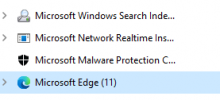
These are ALL of the microsoft processes and they are all background processes
1669126237408.png

Webview2 isn't installed on my computer!
 

Attachments

  • 1669126165110.png
    1669126165110.png
    5.9 KB · Views: 429
A webview is an embedded browser, so some other running app has web content and is using Edge to view it. Close all other apps or just reboot if you can't find it.

Example:
gdnOXls.png
 
A webview is an embedded browser, so some other running app has web content and is using Edge to view it. Close all other apps or just reboot if you can't find it.

Example:
gdnOXls.png
Will it be on a specific type of process or could it be any of them? Like, is it gonna be specifically on Microsoft processes or something like that?
 
It's usually Microsoft-related but it could be anything as the API is available for any application to use.
 
Sorry to bump an old thread, but this is literally the first search result on Bing and restarting my computer would not work to end the clashing process. So I have a solution: use a program called "Process Explorer" by Sysinternals (owned by Microsoft)

1. in the top menu, click "Find" and then "Find Handle or DLL" and type the clashing process name exactly as written in the error menu.
2. Group the results by type and look through the ones of type "Process". Clicking on them should select the process in the main window
3. In the main window, the processes are shown in a hierarchy, try killing the offending process directly, and if that doesn't work, try killing it's immediate parent. Repeat if needed.

If that doesn't end the process, or there is no parent, you have bigger problems than not being able to install OBS...
 
So every time I use the installer it keeps saying "OBS Files are being used by the following application: Microsoft Edge Webview2" I looked at everything and webview isn't installed on my PC. I checked the task manager background processes too but there wasn't anything about webview there and I'm not sure what to do. Could it be seeing other Microsoft Edge background processes and confusing them with ME Webview2 somehow? Someone, please enlighten me!

View attachment 89015
This is the error
View attachment 89017
These are ALL of the microsoft processes and they are all background processes
View attachment 89018
Webview2 isn't installed on my computer!
I just have had exactly that issue installing OBS Studio on win 10. I resolved it by the following way:
Found out process msedgewebview2.exe in task manager. There were several instances of process. Right clicked on the process and selected open location. Then again right clicked on the process and selected termination the tree of the processes. Note, if you have clicked on the child instance, other instances would be live and you need to repeat this procedure untill you find parent instance. After all instances are closed, quickly rename msedgewebvew2.exe in location folder to msedgewebvew2.ex_ for example. This will avoid immediate start of process by system after closing it in task manager. If you could fit to 5-10 seconds, you win :)
Best wishes!
 
Back
Top