

You are using an out of date browser. It may not display this or other websites correctly.
You should upgrade or use an alternative browser.
You should upgrade or use an alternative browser.
I cant hear anything when obs is open
- Thread starter Aceqog
- Start date
Hi Aceqog,
Your audio is primarily channeled into your stream or recording. It would be pretty annoying if you would hear yourself all the time whilst on air.
Check your "Audio Mixer": You should see at least one source active with a signal. You may need to use an "Audio Output Capture" source to allow system sounds, game play sounds etc. to be captured by OBS.
Last but not least, enable an "Audio Monitor" for the audio channel you want to hear. Right click the channel within the Audio Mixer, "Advanced Audio Properties" --> "Audio Monitoring" --> for example "Monitor and Output".
In any case, please provide more information if you ask for advice, it's guesswork above.
morebit.
Your audio is primarily channeled into your stream or recording. It would be pretty annoying if you would hear yourself all the time whilst on air.
Check your "Audio Mixer": You should see at least one source active with a signal. You may need to use an "Audio Output Capture" source to allow system sounds, game play sounds etc. to be captured by OBS.
Last but not least, enable an "Audio Monitor" for the audio channel you want to hear. Right click the channel within the Audio Mixer, "Advanced Audio Properties" --> "Audio Monitoring" --> for example "Monitor and Output".
In any case, please provide more information if you ask for advice, it's guesswork above.
morebit.

Harold
Active Member
The bluetooth headset is EXACTLY why things are breaking.
If your audio is muting when you launch OBS, and you're using a Bluetooth headset, it's caused by the underlying design of Bluetooth.
Bluetooth headsets typically have 2 modes, stereo audio (A2DP), and headset (HFP - Hands Free Profile). These two profiles have separate audio devices on the computer side.
When you have OBS set to activate a Bluetooth headset's microphone, that causes the headset to automatically switch to HFP mode, as A2DP is a lower priority. The reason your audio mutes is because it's still being sent to the A2DP device instead of the HFP device.
To fix this, you either switch to a wired headset, don't use the Bluetooth headset's mic, or set your sound to go through the HFP device for your headset.
Note: HFP offers lower sound quality.

stephanbitterwolf
New Member
I had the same problem. The solution is to turn off audio monitoring.
OBS Settings > Audio > Advanced: Monitoring Device. Change the monitoring device to something other than your headphones. After that, it should be gone.
OBS Settings > Audio > Advanced: Monitoring Device. Change the monitoring device to something other than your headphones. After that, it should be gone.
OH MY GOD THANK YOU MAN I HAD THE SAME PROBLEM AND THIS FIXED IT :DThe bluetooth headset is EXACTLY why things are breaking.
I had the same problem. The solution is to turn off audio monitoring.
OBS Settings > Audio > Advanced: Monitoring Device. Change the monitoring device to something other than your headphones. After that, it should be gone.
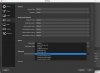
To support stephanbitterwolf, here are the pretty pictures to show you where (as this was the same fix for me after hunting for a few hours and trying numerous devices, configurations, etc.):
Go to OBS settings > Audio > Global Audio Devices
Now change Mic/Auxiliary Audio from default to other options.
This fixed my problem.
I couldnt hear anythig my bluetooth device but OBS was still recording the audio. Now its working perfectly and I can hear audio with bluetooth headphone.

Now change Mic/Auxiliary Audio from default to other options.
This fixed my problem.
I couldnt hear anythig my bluetooth device but OBS was still recording the audio. Now its working perfectly and I can hear audio with bluetooth headphone.

theKVD
New Member
I was coming in to say exactly this. I'm using OBS as a workaround for Camlink not working with browser based video conferencing stuff like Google Meet. I've got a Blue mic and I use my Pixel Buds to monitor the call so I don't have to wear my AKGs. So yeah, disabling the mic is perfect for this use case.Go to OBS settings > Audio > Global Audio Devices
Now change Mic/Auxiliary Audio from default to other options.
This fixed my problem.
I couldnt hear anythig my bluetooth device but OBS was still recording the audio. Now its working perfectly and I can hear audio with bluetooth headphone.
View attachment 74498
Peepeeboyny
New Member
hey guys i tried all this but nothing works. It seems like all sound from everything else just stops working. im using OBS with a diamond video capture card and it shows that audio was going through when recording the video but when im done, the sound from all other programs just dont work...like my sound mixer shows browser as an option for tweeking but no audio is going through browser (tested with youtube)...and even when clicking speakers to test speaker it doesnt play anything says "failed to play test tone"...can someone help me with that?
edit: also to add on...when i open up VLC is doesnt even show up in the sound mixer at all
edit: also to add on...when i open up VLC is doesnt even show up in the sound mixer at all
Last edited:

CubeNite
New Member
If you switch to HFP audio, does OBS also record the low-quality sound?The bluetooth headset is EXACTLY why things are breaking.

mr_shankly
New Member

And you did try all of the above? Audio Monitoring set to Monitor and Output, changed Monitoring Device, changed Global Audio Devices, stopped using bluetooth headset? Then please create a new thread and provide a log file. Here's how.
mr_shankly
New Member
AHH THE AUDIO MONITORING.And you did try all of the above? Audio Monitoring set to Monitor and Output, changed Monitoring Device, changed Global Audio Devices, stopped using bluetooth headset? Then please create a new thread and provide a log file. Here's how.
Thank you so much.
imre.durucz
New Member
RESOLUTION: Disable your in-built Bluetooth on your desktop.
It is likely you are using a headset like Jabra Evolve which has TWO ways to connect to devices and BOTH are connected:
1. a USB Dongle
2. via Bluetooth
If you can't hear nothing whils OBS is running it is because your headset switches to Bluetooth from the Dongle when you start OBS.
Just disable Bluetooth on your PC or simply unpair/disconnect and so use it only via the USB Dongle.
It is likely you are using a headset like Jabra Evolve which has TWO ways to connect to devices and BOTH are connected:
1. a USB Dongle
2. via Bluetooth
If you can't hear nothing whils OBS is running it is because your headset switches to Bluetooth from the Dongle when you start OBS.
Just disable Bluetooth on your PC or simply unpair/disconnect and so use it only via the USB Dongle.
AlienAlphaYt
New Member
i solved this today . this is mainly driver problem . just go to windows support and discuss about it . they will provide you a driver link then all will work good . I try to find this solution everywhere but today i got this by my own . Don't use 3rd party driver updater . Just contact to microsoft support they will solve thiswhenever i have obs open i cant hear desktop or game audio and i dont know how to fix it
Rickastley cool
New Member
Just change stereo to mono if ur on bluetooth headphones
Rickastley cool
New Member
On channels change it to mono if ur on bluetooth headphones
mac.moonfire
New Member
Wait wait wait guys.. wait! pause...
Why is it so hard?
Let's take a moment to take in the absurdity of this problem.
picture this:
Average Joe Shmo; slave to a beaurocratic computered 9-5 job, mortgage, kids, mid-life crisis or whatnot... average Joe Shmo.
Joe has one more of them dreaded web meetings. Joe wishes to have it recorded for later reference. Joe wishes also to hear the clients and his boss AND talk to them. Upon replay, Joe wants to hear his boss, clients AND himself. Joe would prefer not to be tethered to the computer by an umbilical cord sprouting from his hears... that's why he's got those fancy wireless headphones.
Seems like an average situation to me. Why is it so hard? Could OBS developers come up with a fix for this?
I'll get off my soap box, and mean no disrespect to OBS developers who created an awesome and powerful free software. Just wish this issue could be fixable without so much monkeying around.
Why is it so hard?
Let's take a moment to take in the absurdity of this problem.
picture this:
Average Joe Shmo; slave to a beaurocratic computered 9-5 job, mortgage, kids, mid-life crisis or whatnot... average Joe Shmo.
Joe has one more of them dreaded web meetings. Joe wishes to have it recorded for later reference. Joe wishes also to hear the clients and his boss AND talk to them. Upon replay, Joe wants to hear his boss, clients AND himself. Joe would prefer not to be tethered to the computer by an umbilical cord sprouting from his hears... that's why he's got those fancy wireless headphones.
Seems like an average situation to me. Why is it so hard? Could OBS developers come up with a fix for this?
I'll get off my soap box, and mean no disrespect to OBS developers who created an awesome and powerful free software. Just wish this issue could be fixable without so much monkeying around.