Hi everyone,
I’ve been developing a small Windows app called OBS Control Deck for my live sports broadcasts. The idea was to have a compact control surface next to OBS for the things I use most during a production.
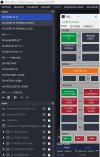
[IMAGE 3 – Main control panel]
It connects directly through OBS WebSocket and currently provides:
configurable scene buttons with active-scene feedback;
dynamic source buttons for each scene, with real-time visibility status;
drag & drop to rearrange scene and source buttons;
customizable button names;
Replay Buffer saving with status/confirmation feedback;
configurable audio mute/unmute controls;
multiple profiles, Auto Connect and Always on Top.
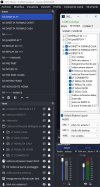
Scenes and sources are read directly from OBS, and I can simply select which ones I want available on the Control Deck.
[IMAGE 2 – Scenes / Sources configuration]
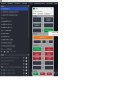
Button labels can also be renamed without changing the real names inside OBS.
[IMAGE 4 – Rename example]
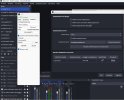
Profiles also store the layout and OBS connection settings.
[IMAGE 1 – Connection / Profiles]
I originally made this for my hockey broadcasts, but the application itself is quite generic and could probably be useful for other OBS productions as well.
I’m already using it during real live streams, and it has reached a point where I’m considering sharing it.
If there’s interest, I’d be happy to clean up the final details and release it for free.
Would something like this be useful in your OBS workflow?
I’ve been developing a small Windows app called OBS Control Deck for my live sports broadcasts. The idea was to have a compact control surface next to OBS for the things I use most during a production.
[IMAGE 3 – Main control panel]
It connects directly through OBS WebSocket and currently provides:
configurable scene buttons with active-scene feedback;
dynamic source buttons for each scene, with real-time visibility status;
drag & drop to rearrange scene and source buttons;
customizable button names;
Replay Buffer saving with status/confirmation feedback;
configurable audio mute/unmute controls;
multiple profiles, Auto Connect and Always on Top.
Scenes and sources are read directly from OBS, and I can simply select which ones I want available on the Control Deck.
[IMAGE 2 – Scenes / Sources configuration]
Button labels can also be renamed without changing the real names inside OBS.
[IMAGE 4 – Rename example]
Profiles also store the layout and OBS connection settings.
[IMAGE 1 – Connection / Profiles]
I originally made this for my hockey broadcasts, but the application itself is quite generic and could probably be useful for other OBS productions as well.
I’m already using it during real live streams, and it has reached a point where I’m considering sharing it.
If there’s interest, I’d be happy to clean up the final details and release it for free.
Would something like this be useful in your OBS workflow?