20:46:33.233: CPU Name: 13th Gen Intel(R) Core(TM) i9-13900KF
20:46:33.233: CPU Speed: 2995MHz
20:46:33.233: Physical Cores: 24, Logical Cores: 32
20:46:33.233: Physical Memory: 65366MB Total, 51536MB Free
20:46:33.233: Windows Version: 10.0 Build 26220 (release: 25H2; revision: 8283; 64-bit)
20:46:33.233: Running as administrator: true
20:46:33.233: Windows 10/11 Gaming Features:
20:46:33.233: Game Bar: Off
20:46:33.233: Game DVR: Off
20:46:33.233: Game DVR Background Recording: Off
20:46:33.233: Game Mode: On
20:46:33.233: Sec. Software Status:
20:46:33.234: Microsoft Defender Antivirus: enabled (AV)
20:46:33.234: Windows Firewall: enabled (FW)
20:46:33.235: Current Date/Time: 2026-04-27, 20:46:33
20:46:33.235: Browser Hardware Acceleration: true
20:46:33.235: Hide OBS windows from screen capture: false
20:46:33.235: Qt Version: 6.8.3 (runtime), 6.8.3 (compiled)
20:46:33.235: Portable mode: false
20:46:33.648: OBS 32.1.2 (64-bit, windows)
20:46:33.648: ---------------------------------
20:46:33.723: ---------------------------------
20:46:33.723: audio settings reset:
20:46:33.723: samples per sec: 48000
20:46:33.723: speakers: 2
20:46:33.723: max buffering: 960 milliseconds
20:46:33.723: buffering type: dynamically increasing
20:46:33.724: ---------------------------------
20:46:33.724: Initializing D3D11...
20:46:33.724: Available Video Adapters:
20:46:33.732: Adapter 0: NVIDIA GeForce RTX 5090
20:46:33.732: Dedicated VRAM: 33750515712 (31.4 GiB)
20:46:33.732: Shared VRAM: 34270648320 (31.9 GiB)
20:46:33.732: PCI ID: 10de:2b85
20:46:33.732: HAGS Status: Enabled (Default: No, Driver status: Supported)
20:46:33.732: Driver Version: 32.0.15.9621
20:46:33.733: output 0:
20:46:33.733: name=LG TV SSCR2
20:46:33.733: pos={0, 0}
20:46:33.733: size={3840, 2160}
20:46:33.733: attached=true
20:46:33.733: refresh=60
20:46:33.733: bits_per_color=8
20:46:33.733: space=RGB_FULL_G22_NONE_P709
20:46:33.733: primaries=[r=(0.649292, 0.330595), g=(0.324212, 0.602424), b=(0.152391, 0.061202), wp=(0.312716, 0.329000)]
20:46:33.733: relative_gamut_area=[709=0.993512, P3=0.732388, 2020=0.525439]
20:46:33.733: sdr_white_nits=80
20:46:33.733: nit_range=[min=0.000000, max=80.000000, max_full_frame=80.000000]
20:46:33.733: dpi=168 (175%)
20:46:33.733: id=\\?\DISPLAY#GSM0001#5&250b84b9&0&UID4352#{e6f07b5f-ee97-4a90-b076-33f57bf4eaa7}
20:46:33.733: alt_id=\\.\DISPLAY1
20:46:33.733: Loading up D3D11 on adapter NVIDIA GeForce RTX 5090 (0)
20:46:33.819: D3D11 loaded successfully, feature level used: b000
20:46:33.819: DXGI increase maximum frame latency success
20:46:33.819: Hardware-Accelerated GPU Scheduling enabled on adapter!
20:46:33.820: D3D11 GPU priority setup success
20:46:33.869: ---------------------------------
20:46:33.869: video settings reset:
20:46:33.869: base resolution: 3840x2160
20:46:33.869: output resolution: 3840x2160
20:46:33.869: downscale filter: Bicubic
20:46:33.869: fps: 60/1
20:46:33.869: format: NV12
20:46:33.869: YUV mode: Rec. 709/Partial
20:46:33.870: NV12 texture support enabled
20:46:33.870: P010 texture support not available
20:46:33.870: Audio monitoring device:
20:46:33.870: name: Domyślne
20:46:33.870: id: default
20:46:33.872: ---------------------------------
20:46:33.874: No AJA devices found, skipping loading AJA UI plugin
20:46:33.874: Failed to initialize module 'aja-output-ui.dll'
20:46:33.875: No AJA devices found, skipping loading AJA plugin
20:46:33.875: Failed to initialize module 'aja.dll'
20:46:33.875: Skipping module '../../obs-plugins/64bit/chrome_elf.dll', not an OBS plugin
20:46:33.877: [CoreAudio encoder]: CoreAudio AAC encoder not installed on the system or couldn't be loaded
20:46:33.878: Failed to load 'en-US' text for module: 'decklink-captions.dll'
20:46:33.878: Failed to load 'en-US' text for module: 'decklink-output-ui.dll'
20:46:33.880: A DeckLink iterator could not be created. The DeckLink drivers may not be installed
20:46:33.880: Failed to initialize module 'decklink.dll'
20:46:33.897: [AMF] Unable to load 'amfrt64.dll', error code 126.
20:46:33.898: [AMF] AMF Test failed due to one or more errors.
20:46:33.898: Failed to initialize module 'enc-amf.dll'
20:46:33.902: [Python] Could not load library: C:/Users/brykk/AppData/Local/Microsoft/WindowsApps/
20:46:33.903: Skipping module '../../obs-plugins/64bit/libcef.dll', not an OBS plugin
20:46:33.903: Skipping module '../../obs-plugins/64bit/libEGL.dll', not an OBS plugin
20:46:33.903: Skipping module '../../obs-plugins/64bit/libGLESv2.dll', not an OBS plugin
20:46:33.905: [NVIDIA Audio Effects:] NVIDIA denoiser disabled, redistributable not found or could not be loaded.
20:46:33.906: Failed to get NVVideoEffects.dll version info size
20:46:33.907: [NVIDIA VIDEO FX]: FX disabled, redistributable not found or could not be loaded.
20:46:33.912: [obs-browser]: Version 2.26.8
20:46:33.912: [obs-browser]: CEF Version 127.0.6533.120 (runtime), 127.145.7+g2b7d20b+chromium-127.0.6533.120 (compiled)
20:46:34.027: [obs-nvenc] NVENC version: 12.2 (compiled) / 13.0 (driver), CUDA driver version: 13.20, AV1 supported: true
20:46:34.066: [obs-websocket] [obs_module_load] you can haz websockets (Version: 5.7.3 | RPC Version: 1)
20:46:34.066: [obs-websocket] [obs_module_load] Qt version (compile-time): 6.8.3 | Qt version (run-time): 6.8.3
20:46:34.066: [obs-websocket] [obs_module_load] Linked ASIO Version: 103200
20:46:34.069: [obs-websocket] [obs_module_load] Module loaded.
20:46:34.072: [vlc-video]: Couldn't find VLC installation, VLC video source disabled
20:46:34.078: ---------------------------------
20:46:34.078: Loaded Modules:
20:46:34.078: win-wasapi.dll
20:46:34.078: win-dshow.dll
20:46:34.078: win-capture.dll
20:46:34.078: vlc-video.dll
20:46:34.078: text-freetype2.dll
20:46:34.078: rtmp-services.dll
20:46:34.078: obs-x264.dll
20:46:34.078: obs-websocket.dll
20:46:34.078: obs-webrtc.dll
20:46:34.078: obs-vst.dll
20:46:34.078: obs-transitions.dll
20:46:34.078: obs-text.dll
20:46:34.078: obs-qsv11.dll
20:46:34.078: obs-outputs.dll
20:46:34.078: obs-nvenc.dll
20:46:34.078: obs-filters.dll
20:46:34.078: obs-ffmpeg.dll
20:46:34.078: obs-browser.dll
20:46:34.078: nv-filters.dll
20:46:34.078: logi_obs_plugin_x64.dll
20:46:34.078: image-source.dll
20:46:34.078: frontend-tools.dll
20:46:34.078: decklink-output-ui.dll
20:46:34.078: decklink-captions.dll
20:46:34.078: coreaudio-encoder.dll
20:46:34.078: ---------------------------------
20:46:34.086: ---------------------------------
20:46:34.086: Available Encoders:
20:46:34.086: Video Encoders:
20:46:34.086: - ffmpeg_svt_av1 (SVT-AV1)
20:46:34.086: - ffmpeg_aom_av1 (AOM AV1)
20:46:34.086: - obs_nvenc_h264_tex (NVIDIA NVENC H.264)
20:46:34.086: - obs_nvenc_hevc_tex (NVIDIA NVENC HEVC)
20:46:34.086: - obs_nvenc_av1_tex (NVIDIA NVENC AV1)
20:46:34.086: - obs_x264 (x264)
20:46:34.086: Audio Encoders:
20:46:34.086: - ffmpeg_aac (FFmpeg AAC)
20:46:34.086: - ffmpeg_opus (FFmpeg Opus)
20:46:34.086: - ffmpeg_pcm_s16le (FFmpeg PCM (16-bit))
20:46:34.086: - ffmpeg_pcm_s24le (FFmpeg PCM (24-bit))
20:46:34.086: - ffmpeg_pcm_f32le (FFmpeg PCM (32-bit float))
20:46:34.086: - ffmpeg_alac (FFmpeg ALAC (24-bit))
20:46:34.086: - ffmpeg_flac (FFmpeg FLAC (16-bit))
20:46:34.086: ==== Startup complete ===============================================
20:46:34.109: All scene data cleared
20:46:34.109: ------------------------------------------------
redacted
20:46:34.709: Switched to scene 'Scena'
20:46:34.709: ------------------------------------------------
20:46:34.709: Loaded scenes:
redacted
20:46:34.709: ------------------------------------------------
20:46:34.747: warning: deprecated pixel format used, make sure you did set range correctly
20:46:53.260: Uploading thumbnail file "D:/Screenshots/Screenshot (2142).jpg"...
20:46:58.904: User is ignoring service bitrate limits.
20:46:58.904: Service Recommendations:
20:46:58.904: video bitrate: 51000
20:46:58.904: audio bitrate: 160
20:46:58.924: [obs-nvenc: 'advanced_video_stream'] settings:
20:46:58.924: codec: AV1
20:46:58.924: rate_control: CBR
20:46:58.924: bitrate: 51000
20:46:58.924: keyint: 120
20:46:58.924: preset: p7
20:46:58.924: tuning: hq
20:46:58.924: multipass: fullres
20:46:58.924: profile: main
20:46:58.924: width: 3840
20:46:58.924: height: 2160
20:46:58.924: b-frames: 4
20:46:58.924: b-ref-mode: 1
20:46:58.924: lookahead: true (8 frames)
20:46:58.924: aq: true
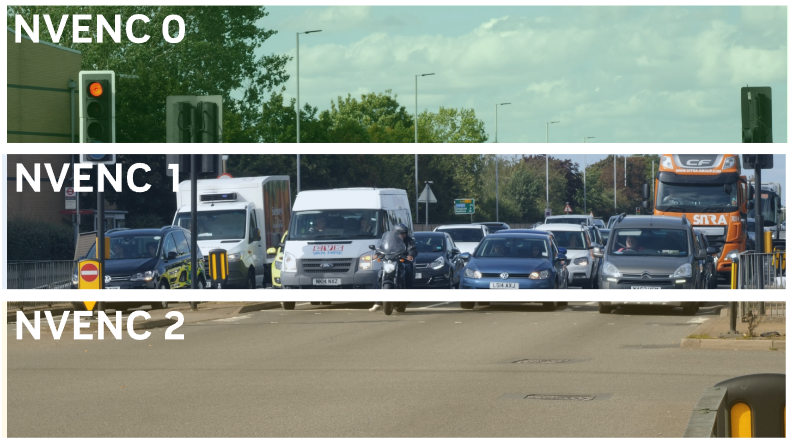
20:46:58.924: split encode: 15
20:46:58.924:
20:46:58.995: ---------------------------------
20:46:58.995: [FFmpeg aac encoder: 'adv_stream_audio'] bitrate: 160, channels: 2, channel_layout: stereo, track: 1
20:46:58.995:
20:46:58.996: [rtmp stream: 'adv_stream'] Connecting to RTMP URL rtmps://b.rtmps.youtube.com:443/live2?backup=1...
20:46:59.033: [rtmp stream: 'adv_stream'] Interface: Killer E3100G 2.5 Gigabit Ethernet Controller (ethernet, 1000↓/1000↑ mbps)
20:46:59.691: [rtmp stream: 'adv_stream'] Connection to rtmps://b.rtmps.youtube.com:443/live2?backup=1 (172.217.171.172) successful
20:46:59.691: [rtmp stream: 'adv_stream'] Socket send buffer is 65536 bytes
20:46:59.696: ==== Streaming Start ===============================================
20:48:04.398: [rtmp stream: 'adv_stream'] User stopped the stream
20:48:04.398: [rtmp stream: 'adv_stream'] Socket send buffer is 4194304 bytes
20:48:04.398: Output 'adv_stream': stopping
20:48:04.398: Output 'adv_stream': Total frames output: 3501
20:48:04.398: Output 'adv_stream': Total drawn frames: 3924
20:48:04.398: [rtmp stream: 'adv_stream'] Freeing 1 remaining packets
20:48:04.398: Video stopped, number of skipped frames due to encoding lag: 3086/3524 (87.6%)
20:48:04.400: ==== Streaming Stop ================================================
20:48:04.786: warning: 2 frames left in the queue on closing