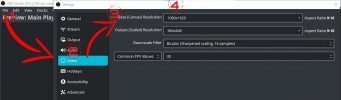
How to change the aspect ratio to 9:16

Thank you for that simple answer. If we type in 9:16 as Base Resolution, what settings do you recommend for Output Resolution and downscale filter?
 
It should be the same as Base (Canvas) Resolution, and then you don't need to use downscale filter. Probably that's the best.
 
PLEASE THIS POST WILL ANSWER YOUR PROBLEM. HERE
 

Attachments

  • Aspect Ratio.jpg
    Aspect Ratio.jpg
    153.8 KB · Views: 4,400
Hi All,

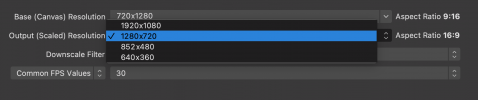
I think this might be a bug, as I was able to change aspect ratio fine until I updated to Mac M1 with Monterey.

I can still type a value into the 'Base (canvas) Resolution' but for the 'output (scaled) resolution' there is only a drop down menu on which all the options are in 'landscape'.

You can see this in the attached image.

I am missing something, this never happened when I used OBS before

Thanks
Ed
 

Attachments

  • Screenshot 2023-04-20 at 17.59.02.png
    Screenshot 2023-04-20 at 17.59.02.png
    94.1 KB · Views: 1,187
Back
Top