
How many concurrent sources can I record with the Source Recorder Plugin?

newbie1

New Member
I wanted to ideally record 4 sources, but I just have an NVIDIA RTX 3060. I know it's not possible. I was wondering if changing the encoding can enable me to record more. Say if I record 1 source with x264 and 1 with NVENC will it make a difference? [Since 1 will load the CPU and 1 will load the GPU - won't that let me record 2 with the NVENC and 1 with x264?]

I there a way to figure out how many sources I can actually record? Or do I have to do trial and error to find out.

Use case: I am trying to record a video podcast with each recording being an individual who joins the podcast. [So 1 for the scene record, and 3 for guests + me, me and 2 other guests].

And for those who do it differently what would you say I should do given my limitations. Is it better to maybe not record individual streams and rely on the main scene which has 3 sources? So just record the scene and 1 guest sources separately?
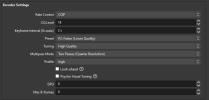
 
(5) concurrent encodes are possible with the 3060. In addition to x264, do you have an iGPU?

What resolution/frame-rate are you recording?
 
(5) concurrent encodes are possible with the 3060. In addition to x264, do you have an iGPU?

What resolution/frame-rate are you recording?

Yes I have an iGPU. I am flexible on the frame rates - I am just starting out so I am not aspiring for extreme stuff. Maybe a 1080 at 30 fps will look good. But I am open to suggestions to go to a lower resolution/framerate if that allows me to record more screens.
 
Might be useful, might not, what is it/CPU?

NVENC H264 1080p/60, see how these settings do when used on all (4) recordings concurrently. If there's encoding lag, try P1, if no lag, try P3.
1710700227154.png
 
Might be useful, might not, what is it/CPU?

NVENC H264 1080p/60, see how these settings do when used on all (4) recordings concurrently. If there's encoding lag, try P1, if no lag, try P3.
View attachment 102617
Processor Intel(R) Core(TM) i7-10870H CPU @ 2.20GHz, 2208 Mhz, 8 Core(s), 16 Logical Processor(s)
Installed Physical Memory (RAM) 16.0 GB

Thanks so much for the suggestion. I will try to see how it works. 2 queries:

1. What do you suggest the best bitrate should be?
2. Do you have any thoughts after seeing the CPU?
 
That's a viable iGPU, it can encode at least (2) 1080p streams concurrently, maybe more. Update to the newest drivers before you start testing it.

CQP rate control is variable bit-rate & will maintain the quality level set using the CQ Level. Try 18, if you want to up the bit-rate/quality, lower it to 15.
 
That's a viable iGPU, it can encode at least (2) 1080p streams concurrently, maybe more. Update to the newest drivers before you start testing it.

CQP rate control is variable bit-rate & will maintain the quality level set using the CQ Level. Try 18, if you want to up the bit-rate/quality, lower it to 15.
So do you suggest I set 2 sources to NVENC, and 2 to x264 [as I understand this is the one that uses the CPU, while the NVENC is what uses the NVIDIA card]. (I will try out 4 sources for starters)
 
I would utilize the hardware encoders (NVENC & QSV) before tapping into x264.

NVENC @ 60FPS, (3) encodes are pushing the encoder more than I care for. Test (2) with NVENC, (2) with QSV, lean on x264 for additional encodes if needed.

The good news is you have the hardware that can do it, just have to spend some time optimizing it.
 
I would utilize the hardware encoders (NVENC & QSV) before tapping into x264.

NVENC @ 60FPS, (3) encodes are pushing the encoder more than I care for. Test (2) with NVENC, (2) with QSV, lean on x264 for additional encodes if needed.

The good news is you have the hardware that can do it, just have to spend some time optimizing it.
Thank you so much. I really appreciate it. I have never found a more responsive and helpful forum!
 
I guess it's time to update my Nvidia driver (522.30), I tried a 4th NVENC session but I'm stuck at a max of 3. Need to update the driver anyway if I want to update to OBS v30.1.
 
Here's my test results for 1080p/60. I don't have Source Record installed but was able to use the Multi-RTMP Output to get the desired number of (4) Sources & (4) encodes. I encoded (2) streams with NVENC & (2) of them with QSV. The NVENC encoder was pretty much maxed @ 80% utililzed while QSV was running right around 50% utilized.
 

Attachments

Last edited:
Correction to the post above. I was running (3) NVENC & only (1) QSV encode.

This is the correct log, (2) of each running, same results with better balance. NVENC was 60- 65% Utilized, while QSV stayed right around 60%.
 

Attachments

I am in the process of building a dedicated recording PC and would like to know the recommended hardware for Source Record at 4K 60fps HDR10+ 4:4:4 and a 480p face cam?

On the plugin webpage, I have read that NVENC doesn't work with Source Record. According to u/marrowheat23 "NVENC new" doesn't work, whereas the older NVENC does. What are the drawbacks I might encounter when trying to record at the aforementioned fidelity using the older encoder?

Should I build a machine with an AMD GPU to circumvent using old encoders?

It is also worth mentioning that I intend to record multiple audio tracks at the same time as well (videogame audio, microphone audio and Discord voice chat).
 
Back
Top