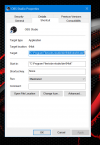
I have two monitors. The first, primary, is set to 4K. I want to startup OBS on my second monitor, which has 1920x1080 resolution. Both Base (Canvas) Resolution and Output (Scaled) Resolution are set to 1920x1080. However, when the program starts, it fills just the upper-left portion of my screen, sort of as if it were running on the 4K monitor resolution.
How do I get OBS, in Admin mode, to fill the entire screen on my second monitor when it first starts up?
Also, I saw a command line to run OBS: start /max /d "C:\Program Files\obs-studio\bin\64bit" "" obs64.exe --startvirtualcam However, my PC doesn't recognize the "start" part of the command. What's going on here?
How do I get OBS, in Admin mode, to fill the entire screen on my second monitor when it first starts up?
Also, I saw a command line to run OBS: start /max /d "C:\Program Files\obs-studio\bin\64bit" "" obs64.exe --startvirtualcam However, my PC doesn't recognize the "start" part of the command. What's going on here?