

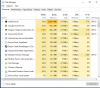
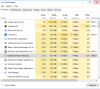
Ever since the last Windows update, I haven't been able to stream from my computer. At first, OBS just refused to open, but when I opened my task manager to force close it, thinking it was just being slow today, I say that it was taking up almost 3k MB, and using up 83% of my RAM, taking minutes to actually open, and when I decided to throw caution to the wind and attempt to stream anyway, no audio at all. This has only started happening since the latest windows update, and I have tried a fresh install. Any ideas?
You are using an out of date browser. It may not display this or other websites correctly.
You should upgrade or use an alternative browser.
You should upgrade or use an alternative browser.
Question / Help High Memory usage
- Thread starter Peev
- Start date

No sirDo you have elgato software installed?
One slideshow in one scene out of maybe 15. About 45 picturesany animated gifs or large slideshow sources?
That looks SO much better. Do you know why that was happening?When OBS finishes loading, try removing that from all scenes it's in and restart obs.
Attachments
Still having the sound issue though. Any advice on that?Because OBS stores all the images in ram in an uncompressed format to have them ready for display on 16ms of warning.
I figured it out. Thank you for the helpPost your OBS session log please.