Motherboard: Asus X99-A II SLI/Crossfire
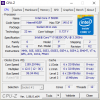
Processor: i7 5820K
CPU Cooler: Noctua NH-U14S Air Cooler
RAM: 32 GB 2133 Mhz DDR4
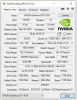
Graphics: 8 GB Geforce GTX 1070 SC ACX
Hard Drive: 2x 120GB SSD, and Western Black 1TB HDD
Internet speed: 47 Mbps down and 40 Mbps upload.
Hello all! I'm having an odd issue atm.
So whenever I go to use obs at 48 fps @ 720p everything is fine..Until I launch a game.
The fps in the games are easily double (or more) of what I'm trying to stream,
but whenever I open a game my obs fps will drop from 48 to anywhere around 5-35fps (35 is super rare) range and stay there.
I've tried lowering the fps to a 30 cap but the frame still drop (5-25ish).
Oddly enough though my webcam runs perfectly smooth during the whole thing.
It's any game I play (or even running in the background) that the stream starts to runs at 5-35 fps on obs.
Any help would be amazing!
Atm I'm running x264, CRB on, 2500 bitrate, cpu at superfast.
I've attached my log as well.
Thanks so much all!
Processor: i7 5820K
CPU Cooler: Noctua NH-U14S Air Cooler
RAM: 32 GB 2133 Mhz DDR4
Graphics: 8 GB Geforce GTX 1070 SC ACX
Hard Drive: 2x 120GB SSD, and Western Black 1TB HDD
Internet speed: 47 Mbps down and 40 Mbps upload.
Hello all! I'm having an odd issue atm.
So whenever I go to use obs at 48 fps @ 720p everything is fine..Until I launch a game.
The fps in the games are easily double (or more) of what I'm trying to stream,
but whenever I open a game my obs fps will drop from 48 to anywhere around 5-35fps (35 is super rare) range and stay there.
I've tried lowering the fps to a 30 cap but the frame still drop (5-25ish).
Oddly enough though my webcam runs perfectly smooth during the whole thing.
It's any game I play (or even running in the background) that the stream starts to runs at 5-35 fps on obs.
Any help would be amazing!
Atm I'm running x264, CRB on, 2500 bitrate, cpu at superfast.
I've attached my log as well.
Thanks so much all!