
Question / Help green and yellow light flickering

2sic_clan

New Member
Hey guys,

i've got a weird problem. My PC is a beast (intel 4770k, nvidea 980, 16GB ram) and my internet connection is 4-5 mbit UP.
But if i confire my settings like the configurator tells me, even if i lower my bitreate to ~1500kbit my light in the right lower corner flickers alot and after some time 3-4 min. my stream laggs alot.

Any suggestions?
 
Hey guys,

i've got a weird problem. My PC is a beast (intel 4770k, nvidea 980, 16GB ram) and my internet connection is 4-5 mbit UP.
But if i confire my settings like the configurator tells me, even if i lower my bitreate to ~1500kbit my light in the right lower corner flickers alot and after some time 3-4 min. my stream laggs alot.

Any suggestions?

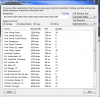
Yes, post a log and also might use this tool for your region and post a screenshot:
http://www.teamliquid.net/forum/tech-support/478845-twitchtest-twitch-bandwidth-tester
 
Log and the twitch tester screenshot are uploaded to the forum :)
 

Attachments

  • twitch_servers.PNG
    twitch_servers.PNG
    71.5 KB · Views: 30
  • 2015-07-15-1644-48.log
    2015-07-15-1644-48.log
    28.4 KB · Views: 16
Log and the twitch tester screenshot are uploaded to the forum :)
you get slightly higher quality to Germany even though Amsterdam is closer. I would try that ingest.

Enable Aero in OBS and use a windows aero theme, not having this enabled can sometimes cause game capture to drop frames.

the log you sent showed no connection stalling so I know know if what I'm seeing here is where you has an issues.


Lastly, watching your own stream and having buffering does not mean your viewers will be buffering. buffering can happen on the client side in many situations that cannot be resolved by the streamer (besides lowering bitrate if to high).
I would enable aero as stated above and rerun tests at your ideal bitrate/buffer then post that log.
 
Back
Top