

Hello everyone! Newbie here. Since downloading; I've been playing on this all the time. Anyways to tried to set-up a scene for my son to record videos of Xbox play with a webcam to upload to YouTube. During playback the audio was good but the video was real glitchy. Any ideas on setting changes or is it my PC?
You are using an out of date browser. It may not display this or other websites correctly.
You should upgrade or use an alternative browser.
You should upgrade or use an alternative browser.
Question / Help Glitchy Recording
- Thread starter Greenie
- Start date
xxAssassin349
Member
Can you post a log of a recording?
RaptorialGaming
New Member
I would be able to assist you better, as I am sure others could if you could download the free version of speccy and screenshot the front page of the app which tells us non advanced users all components of your computer so we can evaluate their capabilities. Also, speedtest.net screenshot would be helpful too! ThanksHello everyone! Newbie here. Since downloading; I've been playing on this all the time. Anyways to tried to set-up a scene for my son to record videos of Xbox play with a webcam to upload to YouTube. During playback the audio was good but the video was real glitchy. Any ideas on setting changes or is it my PC?

EBrito
Active Member
https://obsproject.com/forum/threads/please-post-a-log-with-your-issue-heres-how.23074/
But, for recording you can try:
Simple settings
Recording Quality Indistinguishable
Encoding x264 low CPU or your GPU (if available)
Format FLV
But, for recording you can try:
Simple settings
Recording Quality Indistinguishable
Encoding x264 low CPU or your GPU (if available)
Format FLV
https://obsproject.com/forum/threads/please-post-a-log-with-your-issue-heres-how.23074/
But, for recording you can try:
Simple settings
Recording Quality Indistinguishable
Encoding x264 low CPU or your GPU (if available)
Format FLV
Thanks! That seemed to help tremendously! Under encoder settings; what's the difference between "Software (x264)" and "Software (x264 low CPU usage preset, increases file size)". The later is what I used; was that correct?
https://obsproject.com/forum/threads/please-post-a-log-with-your-issue-heres-how.23074/
But, for recording you can try:
Simple settings
Recording Quality Indistinguishable
Encoding x264 low CPU or your GPU (if available)
Format FLV
So I thought the above worked. It did too a point but the video stream is still choppy. This is a RECORDING only not a stream. Any other ideas or do I just have a bad pc for this kind of recording? Attached is my log.
Attachments
EBrito
Active Member
Video settings:
Canvas 1600x900
Output resolution : choose what gives 600p, 540p or 480p
Rescale filter: Bicubic
FPS: 30
Output setttings: Leave rescale unchecked.
To get 64 bits, as I said, copy shortcut. Edit copy and use
C:\Program Files (x86)\obs-studio\bin\64bit\obs64.exe
and
C:\Program Files (x86)\obs-studio\bin\64bi

Canvas 1600x900
Output resolution : choose what gives 600p, 540p or 480p
Rescale filter: Bicubic
FPS: 30
Output setttings: Leave rescale unchecked.
To get 64 bits, as I said, copy shortcut. Edit copy and use
C:\Program Files (x86)\obs-studio\bin\64bit\obs64.exe
and
C:\Program Files (x86)\obs-studio\bin\64bi
When you install OBS, both 64bits and 32bits are installed.
If you clean install alst version, it defaults to 64 bits.
Previous versions, defualt to 32 bits. Upgrading rom a previous version, leave shorcut as it was. So, 32 bits.
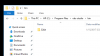
View attachment 23143
I just ran another install and 64 bit is nowhere to be found. any ideas? I dont have an x86 folder. i just have program files.
Attachments
EBrito
Active Member
SORRY!!!!!
Looking at your log, you are running Win 10 32 bits
15:18:53.705: Windows Version: 10.0 Build 14393 (revision: 693; 32-bit)
So, only 32 bits available (obviously)
Forget this part.
So;
Video settings:
Canvas 1600x900
Output resolution : choose what gives 600p, 540p or 480p
Rescale filter: Bicubic
FPS: 30
Output setttings: Leave rescale unchecked.
Looking at your log, you are running Win 10 32 bits
15:18:53.705: Windows Version: 10.0 Build 14393 (revision: 693; 32-bit)
So, only 32 bits available (obviously)
Forget this part.
So;
Video settings:
Canvas 1600x900
Output resolution : choose what gives 600p, 540p or 480p
Rescale filter: Bicubic
FPS: 30
Output setttings: Leave rescale unchecked.