Hello there,
As described above, when I attempt to create a game capture or window capture with OBS, the preview shows a large amount of black pixelation all over the capture. This also carries over into streams and recordings. Display captures, however, work perfectly fine.
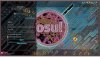
I have attached 2 images: one of what my Osu! normally looks like, and what it looks like in the OBS preview from a game capture. I use Osu! here simply because it is the easiest case for me to show.
As you can see in the image, there's a ton of black pixels, except around the edges of my cursor (the golden circle) and most of the other shapes on the screen. When I move the cursor around, it creates a lot of default cursors overlaid with the black pixels.
The log file for the last session of OBS is also attached, during which the 2 pictures were captured. It is uploaded here because my upload button seems not to be working; it just gives me a blank string to copy. I hope this doesn't cause any inconvenience.
As described above, when I attempt to create a game capture or window capture with OBS, the preview shows a large amount of black pixelation all over the capture. This also carries over into streams and recordings. Display captures, however, work perfectly fine.
I have attached 2 images: one of what my Osu! normally looks like, and what it looks like in the OBS preview from a game capture. I use Osu! here simply because it is the easiest case for me to show.
As you can see in the image, there's a ton of black pixels, except around the edges of my cursor (the golden circle) and most of the other shapes on the screen. When I move the cursor around, it creates a lot of default cursors overlaid with the black pixels.
The log file for the last session of OBS is also attached, during which the 2 pictures were captured. It is uploaded here because my upload button seems not to be working; it just gives me a blank string to copy. I hope this doesn't cause any inconvenience.