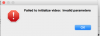
N Nicholas Gonzalez New Member Oct 2, 2015 #1 OSX Yosemite 10.10.2 OBS was working perfectly fine for a few minutes. I closed it out. Now I get this error message after trying to open the program. I tried reinstalling OBS but now I always get this error message trying to open it. Please help. Attachments img.png 21.4 KB · Views: 121
OSX Yosemite 10.10.2 OBS was working perfectly fine for a few minutes. I closed it out. Now I get this error message after trying to open the program. I tried reinstalling OBS but now I always get this error message trying to open it. Please help.
amsyar ZeRo Member Oct 3, 2015 #2 Nicholas Gonzalez said: OSX Yosemite 10.10.2 OBS was working perfectly fine for a few minutes. I closed it out. Now I get this error message after trying to open the program. I tried reinstalling OBS but now I always get this error message trying to open it. Please help. Click to expand... Try following this guide on uninstalling:http://forums.macrumors.com/threads/best-way-to-fully-delete-a-program.999635/#post-11171082 If you don't find the post,it's number #16. Tell me the progress after trying it.
Nicholas Gonzalez said: OSX Yosemite 10.10.2 OBS was working perfectly fine for a few minutes. I closed it out. Now I get this error message after trying to open the program. I tried reinstalling OBS but now I always get this error message trying to open it. Please help. Click to expand... Try following this guide on uninstalling:http://forums.macrumors.com/threads/best-way-to-fully-delete-a-program.999635/#post-11171082 If you don't find the post,it's number #16. Tell me the progress after trying it.
N Nicholas Gonzalez New Member Oct 4, 2015 #3 I found the hidden folder using the steps provided, deleted everything, reinstalled, and now it opens. Thanks so much man.
I found the hidden folder using the steps provided, deleted everything, reinstalled, and now it opens. Thanks so much man.
amsyar ZeRo Member Oct 4, 2015 #4 Nicholas Gonzalez said: I found the hidden folder using the steps provided, deleted everything, reinstalled, and now it opens. Thanks so much man. Click to expand... You're welcome.
Nicholas Gonzalez said: I found the hidden folder using the steps provided, deleted everything, reinstalled, and now it opens. Thanks so much man. Click to expand... You're welcome.