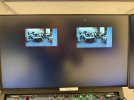
Hi all! I've been having a weird issue with OBS for the past few weeks. We are using OBS to record mostly static shots of events that take place in my workplace's events center. We aren't using it to stream out, just record, and this is being run off a Windows 11, Intel UHD Graphics 630 card. We will launch OBS, and sometimes it works like regular, but most of the time recently the entire screen is black out except for what's being captured. The settings are blacked out, "start recording" blacked out, etc.. I've attached a pic to show what it looks like. I can't even click anywhere within the window without alt-tabbing out of it to close the window.
I've searched through these forums and have disabled HAGS as suggested in other forums, as well as updated the graphics driver, ran as Administrator, uninstalled/reinstalled OBS, restarted the PC, and so far nothing has worked. I have also tried going into custom graphics settings through Windows settings and have tried running OBS using both the high-performance and power saving driver options, but that doesn't work either. Am I missing something obvious? I've attached two logs from launching OBS both with and without running as Administrator. Thanks for any help!
I've searched through these forums and have disabled HAGS as suggested in other forums, as well as updated the graphics driver, ran as Administrator, uninstalled/reinstalled OBS, restarted the PC, and so far nothing has worked. I have also tried going into custom graphics settings through Windows settings and have tried running OBS using both the high-performance and power saving driver options, but that doesn't work either. Am I missing something obvious? I've attached two logs from launching OBS both with and without running as Administrator. Thanks for any help!