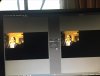
have recorded successfully and as stated in the title in the block of right hand tabs such as start recording stop etc, I tabbed the edit/studio enter one and now cannot return. What do I need to do?
In Studio Mode you will have Preview and Program panes (note the labels at the top). Program shows the actual broadcast/recording, while you can have another scene in Preview and make adjustments, ie. pan and zoom a camera to the appropriate position or adjust an applied filter. These adjustments are not seen by the audience. Then at the right time you can have one of various Transitions to bring the prepared scene from Preview to Program.
Regarding your screenshot: until you select another scene in Preview, the same scene as Program will be visible there.
An easier way to switch off Studio Mode would be to click the Studio Mode button again at the Controls section ;)
This site uses cookies to help personalise content, tailor your experience and to keep you logged in if you register.
By continuing to use this site, you are consenting to our use of cookies.