Hi,
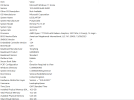
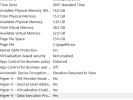
I am fairly new to streaming, but I have come across an issue with OBS recently. I am now getting the above error code. Originally, when I multistreamed to YouTube and to Twitch, however, I was streaming to Twitch only today, and after 18 minutes, the stream began to stutter, and this message appeared on OBS. This also then happens when recording videos. I have turned down my Bitrate to 6000, my preset to P5 from P7 (even tried as low as P2) but still no joy. The only way i can reset the stutter is by rebooting my PC, but the problem keeps coming back. Any ideas please? I'm Using Nvidea NVENC H 2.64 and the lapop is only a coule of years old, however, It could well be that the laptop's graphics card may not be able to keep up with streaming from my PS5 through my capture card to the laptop and then streaming in 1080 60fps? Please see the OBS log details after restarting the laptop and laptop specs in the pictures below.
Please any help would be massive.
Many Thanks
I am fairly new to streaming, but I have come across an issue with OBS recently. I am now getting the above error code. Originally, when I multistreamed to YouTube and to Twitch, however, I was streaming to Twitch only today, and after 18 minutes, the stream began to stutter, and this message appeared on OBS. This also then happens when recording videos. I have turned down my Bitrate to 6000, my preset to P5 from P7 (even tried as low as P2) but still no joy. The only way i can reset the stutter is by rebooting my PC, but the problem keeps coming back. Any ideas please? I'm Using Nvidea NVENC H 2.64 and the lapop is only a coule of years old, however, It could well be that the laptop's graphics card may not be able to keep up with streaming from my PS5 through my capture card to the laptop and then streaming in 1080 60fps? Please see the OBS log details after restarting the laptop and laptop specs in the pictures below.
Please any help would be massive.
Many Thanks