Question / Help Dual PC Streaming Audio Help

huemaster

New Member
I am having issues getting the sound to work on my streaming PC. When I hear the game audio and skype the stream isn't able to hear anything. When I messed with things in the playback tab and recording tab under sound the stream was finally able to hear the game audio but, they could not hear skype and I was also not able to hear anything. I hope that isn't too confusing.

This is how I have my set up right now.

  • I have a Behringer x1204usb that connects to my streaming PC via USB.
  • My mic in channel 1.
  • A TRS 3.5mm to dual 1/4" plugged into channel 5/6 that goes into the line out on sound card 1 in my gaming PC. This is for my gaming audio.
  • Another TRS cable plugged into channel 7/8 that goes into the line out on sound card 2 in my gaming PC. This is for skype.
  • The aux cable goes from my mixer to the mic in on sound card 2 in my gaming PC.
Do I have everything plugged in right? What needs to be set as default device and default communications under playback and recording tab for both gaming and streaming PCs? Finally, what should my audio settings be in OBS?

Also, I do have an Avermedia Live capture card and my headset is wireless (idk if that matters).
 
why did you go from the behringer aux into your gamingirg? you have a second pc wich is do the stream, right? then go to this one, not to the gaming rig. similar to my setup. 2 pcs - avermedia extreme cap u3 - behringer xenyx 802

gamingrig:
soundcard 1 (gaming audio) - line out - channel 5/6 on behringer
soundcard 2 (skype) - line out - channel 7/8 on behringer
mic - xlr (I think?) on behringer

behringer:
aux - line IN on streamingrig

devices on the streaming rig:
playback and recording in windows: that doesent matter, because you can setting up obs to every device wich is connected.

obs audio settings:
desktop audio device: unless u dont use any playback audio on your streamingrig, you can choose some you want from the list. its only important that you setting up some. if u dont, obs will not work i think. you can mute the audio on the speaker icon above "start streaming" in the main window of obs.
microphone: this is the important thing, because your entire audio comes from your gamingrig via the behringer. you have plugged in the behringer via aux in a line in of your soundcard, so you have to choose exactly this line in in the obs settings. not the mic in.

that almost all. figure out whats the best level for mic, ch 5/6 and ch 7/8 and give it a try.

so with this config, you will only be able to hear one device on your gaming rig. whould say, your headset. you can use the "phones" channel of the behringer to hear everything from the gamingrig. but note, you will hear your mic too,
except you can cut off the mic input from the phones. i cant do that on my mixer
but, if you got 2 soundcards in your gaming rig, u can use "stereo mix" to hear booth cards.

please note: this will only work, if your headset got his own soundcard!! like a usb dongle.

check the following on your gamingrig:
playback: set one soundcard as your default. maybe the onboard card
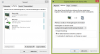
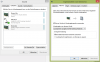
recording: if u got 2 cards, you should have 2 stereo mix entrys. double click it and navigate to the "listen" tab. check "listen to this device" and choose your headset from the dropdown menue. make the same for the other stereomix.

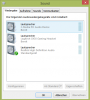
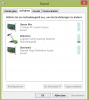
i have attached some pics from my settings. but its german ;)

hope i understand your question right, and you understand my setup tip right. feel free to ask more.
 

Attachments

  • playback.PNG
    playback.PNG
    29.6 KB · Views: 183
  • recording.PNG
    recording.PNG
    24.6 KB · Views: 166
  • stereomix1.PNG
    stereomix1.PNG
    48.6 KB · Views: 162
  • stereomix2.PNG
    stereomix2.PNG
    47.7 KB · Views: 149
Last edited:
I had watched videos and looked at diagrams and saw the aux cable plugged into the gaming PC which is why I did that. Now, I did everything you said and was still unsuccessful so I don't know if I'm plugging in the wrong things or what. I made a diagram of how my stuff is plugged in and have screen shots of my playback, recording, and stereomix stuff.


Problems I'm having are:
  • Stream can't hear game audio unless I set avermedia capture card as default device. If I do that then I can't hear the game audio.
  • Confused on how I would be able to communicate with friends via skype or teamspeak on my gaming PC if my mixer is plugged into the streaming pc. Would I just need another mic for that problem? I tried using a VOIP on the streaming PC but could not hear the other person talking but they could hear me just fine.
  • For some reason I am not able to control the volume for the game using the mixer (which is why I'm wondering if I have something plugged in wrong).
Sorry for having so many problems! This audio is a pain in the butt.
 

Attachments

  • stream setup.png
    stream setup.png
    126.3 KB · Views: 126
  • Sound options.png
    Sound options.png
    94.2 KB · Views: 105
Your default device is an optical audio device. Since you say, u use 3.5 jacks, this is wrong.


For a better overview, disable all devices u don't use. Then right click and uncheck "show disable devices"
 
Alright, I have disabled all devices I don't use and unchecked "show disable devices".
 

Attachments

  • sound.png
    sound.png
    40.6 KB · Views: 67
But there are only Digital devices as playback devices. If u use 3.5 jacks, u must activate and use the normal speakers. Did u hear any Sound from this default device?!

Is there an normally realtek high definition audio device with a speaker as his icon? You can only listen on the normally speaker devices I think. Not the digital, and not the digital (optical) ones.
 
Only cords I use 3.5 mm for are the TRS cables and aux cable. My headset is a wireless headset so it's not being plugged in by 3.5 mm jack.
 
Ur Config seems too wired for me, lol.

If you use only 3.5 cables, try activate everything with an speaker icon on playback devices. Recording devices are fine. Is there any usb sound card?
 
Everything is normal compared to everyone elses except for the headphones because its wireless, not usb lol. I don't use any usb sound cards.
 
Can u post a picture of the recording tab on the Streaming rig plz.

I'm confused since this digital audio thing is only spdif/optical cable output, wich u don't use. But u can hear the game audio via this digital device? Is there any level on the behringer?
 
When the behringer is plugged into the streaming PC it also shows up in the recording tab. What do you mean by level on the behringer?

I have an astro a50 wireless headset. The optical is what lets me hear the surround sound.

Inputs Front
Optical In, AUX In (3.5mm)

Output Front
Optical Passthrough, USB Power & Voice, USB Charging Port

Power Supply
USB mini-B (USB 2.0 compatible)

Hope this helps you understand
 

Attachments

  • streaming rig.png
    streaming rig.png
    68.4 KB · Views: 85
I mean the Lights on the Behringer. Is there any level when you are Gaming? Unfortunately i cant help with the digital audio thing. That are too many devices and cables, so i cant help from far away. It seems my Setup is to different.

Is this pic from the Streaming rig? Did you connect the Behringer with the Line IN of this Rig?
 
That is from the streaming rig but the behringer wasn't hooked up to the streaming PC. It was hooked up to the gaming one. Only time when the mixer is plugged into the streaming PC is when I'm streaming.

Also, the mixer is plugged in via usb. When I looked at diagrams and vids, I saw you could either use usb or through the Line in.

I'm not seeing any level with the game audio. Only lights I see is from when I talk.

I also got a pair of simple earbuds (that plugged into the stream PC via 3.5mm jack) to test out the audio and everything worked. So the problem I now have is just being able to adjust the gaming volume with the mixer and getting a new pair of headphones that aren't wireless, since that seemed to be the problem the entire time.
 
i would recommend not to use usb. only with 3.5 jacks e.t.c.
Or is the usb the only power supply for this behringer?
 
You have to plug a 3.5mm in the line in on the streaming rig in every case. That should be an output of the mixer. At my Behringer its called "main out" Could be different depend on the model. Master out, Booth, Rec. Thats are all outputs. i have seen your mixer has xlr outputs in the back, so this should help.

but, if u unplug the usb from the mixer, is there power anyway on it?
 
Back
Top