
Question / Help Dropping under 30 FPS in OBS/STREAM but not in-game (Ryzen 7)

String910

New Member
Hello guys,

I have a Ryzen 7 1700
16 GB RAM
and a GTX 760 2 GB, it's an old videocard...i know.

My problem is that in newer games like PUBG or Hellblade, the frame rates in OBS drop from 30 to even less than 10 and oscillate between that and 30, but in game there is no problem at all. The in-game FPS are good.

What's the problem and how can I fix it?
Thanks!
 

Attachments

Hi

I have met similiar problem with my friend's PC. He can't post English (I barely can too), so I can tell you all I know.

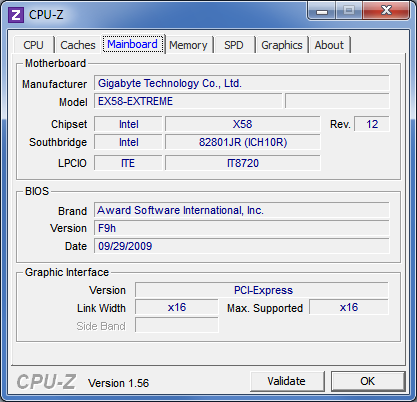
Did you check pcie bandwidth? We checked on pretty same config in CPUZ (ryzen 1700+660gtx+asus b350-f gaming mobo), and it was 1x. Maybe that is the reason?

CPU-Z-Mainboard-Screen.png


We succeded to run gpu on x4, but no more, after that we change 660 to 1060 and it works fine. But my friend complains that the picture quality and capture smoothness is not very good anyway. Don't know how this is even possible. Also I noticed if you alt+tab from game, capture FPS fixes somehow. Maybe that can clarify reasons of issue.
 
Code:
13:00:14.377: Output 'simple_file_output': Number of lagged frames due to rendering lag/stalls: 2207 (37.8%)

You're maxing out the video card which OBS doesn't like. Streaming PUBG on a GTX 760 is pretty much a witch even if you turn the game settings to minimal, as is Hellblade.
 
Code:
13:00:14.377: Output 'simple_file_output': Number of lagged frames due to rendering lag/stalls: 2207 (37.8%)

You're maxing out the video card which OBS doesn't like. Streaming PUBG on a GTX 760 is pretty much a witch even if you turn the game settings to minimal, as is Hellblade.

His log says x264 encoder, so he isn't streaming by using the card. Probably is maxxing the card by the game's settings, even on low but I'm not really sure how the card is relevant when it's the CPU doing the work.
 
His log says x264 encoder, so he isn't streaming by using the card. Probably is maxxing the card by the game's settings, even on low but I'm not really sure how the card is relevant when it's the CPU doing the work.

Don't matter if it's x264 or NVENC or AMF. OBS needs some spare GPU power regardless of encoder. Lagged frames in the log is a result of GPU overloading.
 
Did you check PCI-E bandwidth? GTX 760 is not the best, but if you run 1x or 4x pci-e it will be much worse. Maybe you have encountered compatibility issue. As I said, I met such problem on Ryzen platform.
 
Back
Top