DistroAV - Network Audio/Video in OBS-Studio using NDI® technology

DistroAV - Network Audio/Video in OBS-Studio using NDI® technology 6.1.1

I created 4 scenes with NDI sources. And created another multi view scene to show the 4 scenes. But I found that the 4 DNI scenes were getting unsynchronized gradually.
Even I show the same NDI source in the multi view scene, the 4 screens are also getting unsynchronized gradually.
Would you please advise how to resolve it? Or any fix for this issue please? Thank you very much.
 
I created 4 scenes with NDI sources. And created another multi view scene to show the 4 scenes. But I found that the 4 DNI scenes were getting unsynchronized gradually.
Even I show the same NDI source in the multi view scene, the 4 screens are also getting unsynchronized gradually.
Would you please advise how to resolve it? Or any fix for this issue please? Thank you very much.
I wonder if that might be related to my issue, which I'm close to solving a different way.

I have a lower thirds display from NDI, which is actually full-screen with most of it transparent, as its own scene to use with the Downstream Keyer plugin so I don't have to duplicate it on *every* scene.
And as a workaround to a physical signal capture that decided to go on strike, I have a second NDI feed from the same software on the same other machine. That one is duplicated to both its own scene all by itself, and a "Picture-in-Picture" scene that has it in the bottom corner for the Downstream Keyer to use.

Before I started having trouble with the physical capture, I only had the one NDI feed, for lower thirds (only one copy of it across all of OBS), and that worked perfectly. But when I added the second NDI feed to cover the capture problems (and made several copies of it, everywhere that the physical capture was), both started lagging randomly. Both feeds are meant to be a slideshow, so I don't know what smooth video would do, but the slide transitions are delayed anywhere from imperceptible to about 2 seconds, compared to the physical display that the physical capture is split from, independently randomly for both NDI feeds.

My solution, of course, is to get the physical capture back to working and then delete the workaround NDI feed, which would leave me with just one copy of one feed again and no more. I think I'm all but there now: just needs some more testing to make sure it's reliable. But not everyone can do that.
 
Last edited:
Thank you very much for your opinion. My case may be a little different. My case is that I have 4 cameras (may be more) connecting NDI devices, OBS gets the 4 NDI signals and dynamically assign the 4 cameras to different combination of multi view scenes, user can choose different multi view scenes to be shown. So it may not be suitable to be done by physical capture.
My concern is that the 4 cameras are capturing the same object in different angles, but they get unsynchronized gradually shown on a OBS multi view scene.
 
Thank you very much for your opinion. My case may be a little different. My case is that I have 4 cameras (may be more) connecting NDI devices, OBS gets the 4 NDI signals and dynamically assign the 4 cameras to different combination of multi view scenes, user can choose different multi view scenes to be shown. So it may not be suitable to be done by physical capture.
My concern is that the 4 cameras are capturing the same object in different angles, but they get unsynchronized gradually shown on a OBS multi view scene.
I was thinking more about the code that handles NDI, having a single bug that causes both problems. The more ways the same thing manifests itself, the more detail there is to track it down with. But there's also the possibility of it being two separate problems.

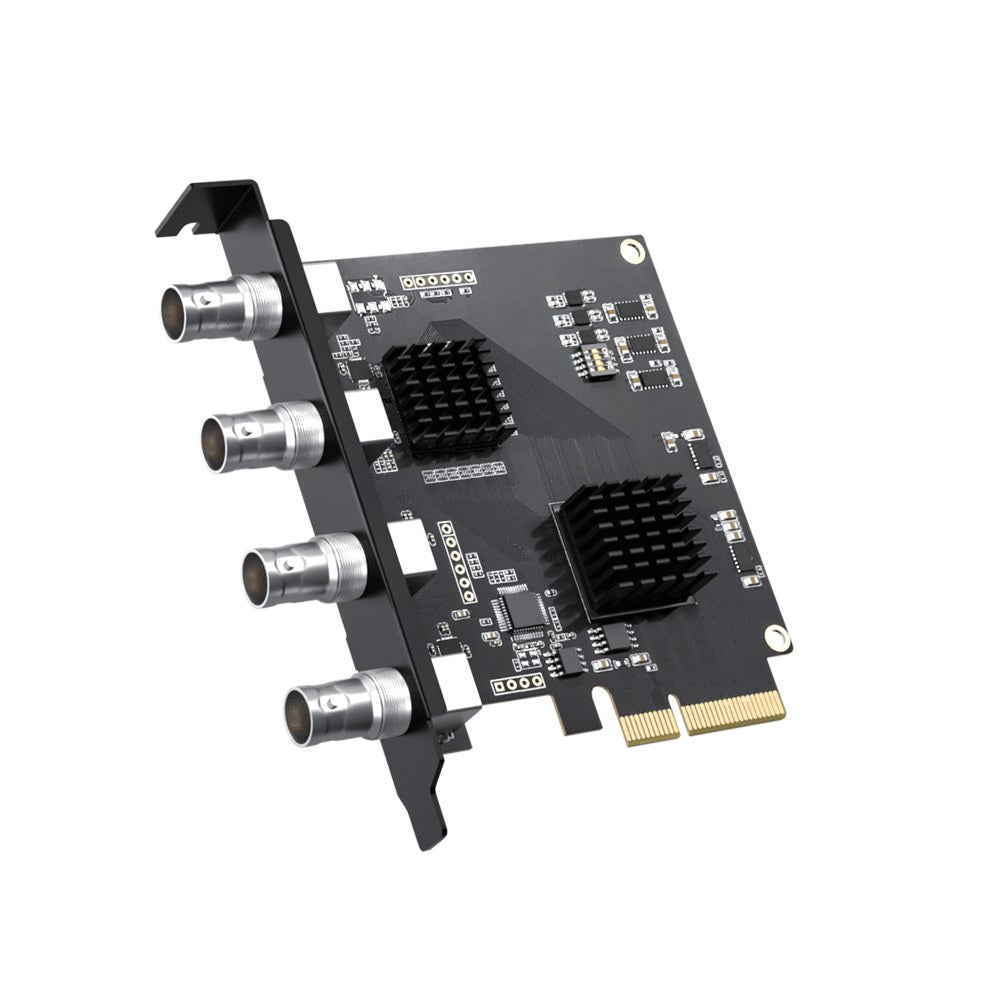
Anyway, what you said just now, does give me an idea. There are multiple-input capture cards that inherently don't have a mutual de-sync problem. And the overall latency is also low enough to use for a live display through OBS. The one thing you have to be extra careful about, especially if you're sorting by price, is that it's cheaper for the manufacturer to use a single converter and a 4-input switch, instead of 4 separate converters. A single converter can only show one input at a time, but they're often sold as 4-input with no mention of that. A big red flag is if it focuses on security more than broadcast. Different use, different priorities, same search terms.

I used to have good luck with this, but it seems recently that they have problems with both quality control and compatibility with Linux, despite having a Linux driver on their website that says it's supposed to work:
The first link is 4x SDI, and what I actually have. My two PTZ cameras have SDI out, and they run straight into the card. My other two sources convert from HDMI to SDI: one much farther away than HDMI will go by itself, and one right next to it because there isn't a 3x SDI + 1x HDMI option.
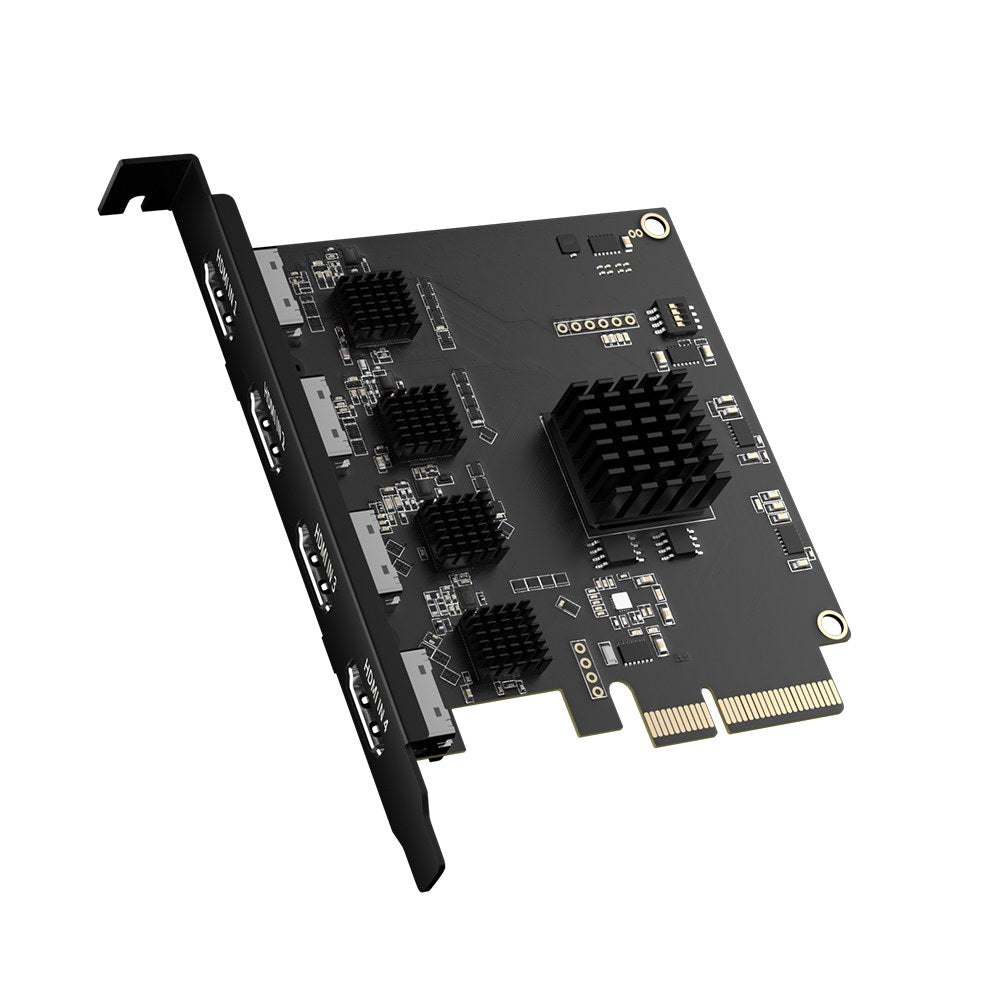
The second link is a 4x HDMI version of the same thing.

There's also this, which I haven't tried yet and looks suspiciously similar:
This one has a third option for 2x SDI + 2x HDMI, which might be useful in some cases. I wouldn't mind seeing the other two possibilities as well, but variation costs money to make and keep track of, so I understand if that never happens.

Both brands say they support multiple simultaneous cards, so you're not limited to just 4 inputs. I think the ACASIS one says you can put up to three cards on the same motherboard for a total of 12 inputs, provided of course that you have the slots for it. But be careful with that too. Just because it fits, doesn't necessarily mean it'll work. Each slot still has to be fast enough, which I found out the hard way and ended up grinding my case to use the one slot that is.

Anyway, assuming you end up with a bunch of simultaneous low-latency physical captures that work reliably, what's the difference between that and a bunch of NDI feeds? If the auto-switch or auto-composite logic in OBS happens after it gets a picture, then you can swap the sources and everything still works, right?

 
Being a fan of Ethernet based NDI (in general terms) vs separate cables for video (with Pro's & Con's to each approach)... I be inclined to make sure it isn't the physical network, the PC (NIC, driver, etc) or the OBS Studio setup causing the de-sync situation.
1. I'd start by doing a portable OBS Studio setup, with absolutely no filters, effects, other plugins than absolutely required for NDI feed ... and testing that setup.
- start with each camera viewed only on its own. and check/test. If that works, then I'd be inclined to resize and display all 4 video feeds simultaneously... and watch/test...
- and use a sync tool (sync video running on tablet or similar)
[after I type this, it occurred to me..] better yet, like all audio and video source troubleshooting, often better to test at OS layer first. In this case, using only NDI Tools or similar. [reboot PC, let settle, do not turn on OBS Studio, etc... minimize unnecessary background tasks (including any auto-start items that should probably be turned off anyway.. ex. Office, Edge, etc)
- while you are at it... best if cameras and OBS Studio PC plugged into same Ethernet switch, and that switch not a low-end consumer device, and care taken to make sure VLAN, ACL or other switch settings not causing Jitter/Latency.

- if that works, then you know the network is okay, as well as the PC's NIC, etc. and your troubleshooting gets much narrower.
 
it occurs to me , another unlikely, but possible issue is the cameras themselves getting out of sync
More advanced cameras use GenLock (at least, I think that is what Panasonic NDI cameras called it).. basically the idea being that the cameras are all synced to a common source.
IT is entirely possible that the cameras themselves are getting out of sync
- for example, I've seen NDI cameras default setup for multiple outputs but you are only using 1... those extra outputs (depending on settings) can use up camera CPU cycles.
- cheap, no-name cameras may not have best Quality Control for firmware, internal clock accuracy, etc
so, when doing earlier test... another test scenario might be to see if reducing # of cameras reduces issue (indicating load on network or OBS Studio PC), or if you can find 1 camera drifting more than the others....
 
Bonjour, jai suivis l'installation pour Windows mais a l'ouverture de OBS, jai un message d'erreurs "Bibliothèque manquantes".
Même une fois installer, toujours l'erreur. Pouvez vois m'aider ?
 
Back
Top