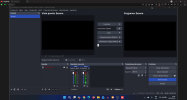
Display freezes, just two windows visible.

member

New Member
On my Windows laptop, OBS has suddenly started misbehaving. It was working perfectly fine till yesterday. I have tried to check after disabling most apps. On Task Manager, OBS takes only 60MB memory and a lot of memory, CPU, disk are free. I have reinstalled the latest version of OBS too.
The menus suddenly go off, and only the preview and program windows are visible. The mouse is also not there and the screen becomes fully unresponsive. However, when I take screenshot, it shows full OBS!
If it helps: when I close OBS, the windows show ghost appearances for a second before they vanish. Similarly, when I start OBS, different elements come one by one, not in one go. I restarted the laptop but it still happens.
 
Last edited:
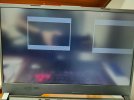
I have been running in to this issue as well. The only thing that seems to work is restarting the computer and it will work for a while but I have no idea if it will happen if I open OBS again. Here is the log from the most recent instance of it happening. Anyone have any ideas about this?
 

Attachments

I´m having the exact same issue and I also have a very similar laptop. Mine has a gtx 1650 Ti. Its an Asus Rog Strix.
What I have found is, if I disable the studio mode, or adjust the width of the scenes, it works again or a least for a while (I remotely connected using anydesk and you can actually see everything).
I think it has to be something related with the graphic card, because I restarted using the safe mode and the problem was still there. And I also use it with another laptop that doesn´t have a dedicated graphic card (ryzen 5 5000 series with amd radeon) and it works perfectly. And it has to be some update of the last 6 months ago, because prior that, everything worked perfectly. Hopefully we get to find a solution or someone helps us here.
For now, without the studio mode its working, we´ll see for how long.
I have been running in to this issue as well. The only thing that seems to work is restarting the computer and it will work for a while but I have no idea if it will happen if I open OBS again. Here is the log from the most recent instance of it happening. Anyone have any ideas about this?
 

Attachments

  • 2026-04-28 at 2.47.47 PM.jpeg
    2026-04-28 at 2.47.47 PM.jpeg
    111.9 KB · Views: 1
  • 2026-04-28_12h20_38.png
    2026-04-28_12h20_38.png
    319.2 KB · Views: 1
Back
Top