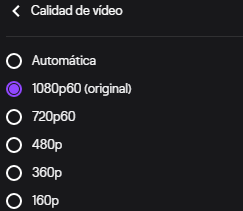
Question / Help Diferent resolution in settings and the ones that show up in twitch?

mgsthebest

New Member
I being streaming quite a while on twitch always at 720p with 3k bitrate is what i have set in the video settings but when i go live twitch says im streaming at 1080p and im droping alot of frames and this just start to happend 2 days ago i double check settings and i have move anything there for months only changing twitch servers still the vod on twtich says the video is at 720p so im not sure what could be causing this?
jc0q70.png
unknown.png
 
23:28:01.344: Output 'adv_stream': Number of dropped frames due to insufficient bandwidth/connection stalls: 27066 (51.0%)

I don't know why Twitch says you're streaming 1080p60, because you clearly aren't.

You're also dropping half your frames even at 2500Kbps, so you've either got a connection that is completely unsuited to streaming, or you have a network problem that needs addressing. Check your NIC, drivers, local cabling and router, then complain to your ISP.

Also from your logfile: 1) Update Windows, you're 2 years out of date, and 2) don't use multiple game/display captures in a single scene, it's a recipe for bad performance. Keep game and display captures separate, and either keep game captures apart in separate scenes or scene collections, or use a single game capture source and reconfigure it on a per-game basis. Multiple game captures can interfere even when inactive and make OBS less performant and/or less reliable.

 
I just caught your post and something very similar started happening to me recently. On Friday when I started streaming I checked the settings on my OBS like I usually do and it was set to 1920x1080/60fps. However... once I started streaming to YouTube it started showing up as 720HD/60fps. I thought this was just by coincidence so I decide to run a test stream on Twitch and the EXACT same thing happened. For whatever reason, OBS keeps switching my resolution to 720HD when I want it at 1080HD. Everything was fine but then all of a sudden it feels like it's being forced to stream at that lower resolution.
 
23:28:01.344: Output 'adv_stream': Number of dropped frames due to insufficient bandwidth/connection stalls: 27066 (51.0%)

I don't know why Twitch says you're streaming 1080p60, because you clearly aren't.

You're also dropping half your frames even at 2500Kbps, so you've either got a connection that is completely unsuited to streaming, or you have a network problem that needs addressing. Check your NIC, drivers, local cabling and router, then complain to your ISP.

Also from your logfile: 1) Update Windows, you're 2 years out of date, and 2) don't use multiple game/display captures in a single scene, it's a recipe for bad performance. Keep game and display captures separate, and either keep game captures apart in separate scenes or scene collections, or use a single game capture source and reconfigure it on a per-game basis. Multiple game captures can interfere even when inactive and make OBS less performant and/or less reliable.

most of them are for specific games that are a pain in the ass to get it work so they are deactivate mos of the time but the issue still was twitch then i just decide to do a test run on youtube and youtube works perfect no issues with dropping frames the issue is now with twitch and is weird because i being streaming almost 2 years on twitch and this issue just start from one day to another
 
Then you need to address the issue with your ISP and run TwitchTest to see if a different ingest server will work better for you.
 
Back
Top