I am not sure why, but after building some new scenes, OBS simply does not start. Prior to this occurring, I would have to reactivate my cam to get it to show up.
I don't remember installing anything called personify on my comp, and i can't find it even mentioned in a single one of my files. what is it, and how do i remove it?
I am looking everywhere on my desktop. It's not in my list of programs, it's not in any of my files, it's not in my list of downloads... this isn't even a new webcam. it's a logitech c615, it won't even let me use the feature.
it is nowhere. just tell me what to do
only thing that comes up is when i was searching for it with cortana.
my webcam is a plug and play, so its drivers should uninstall whenever it gets removed, right? i tried unplugging the webcam and uninstalling the drivers and changing scene collections and it still crashes
in windows what? file explorer? i've already searched my whole pc for it and came up with nothing.
If I'm so illiterate with computers that I don't even know how to search for files on my own computer, and multiple people including admins can't help me, I think I'm better off just waiting patiently for the devs to come up with a fix. I can just wait on multiview. Thank you all for trying :p
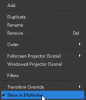
so i just found out about this button:
turns out I don't need to have a certain amount of scenes in my scene collection to make it work...
i guess i didn't have a problem in the first place....
This site uses cookies to help personalise content, tailor your experience and to keep you logged in if you register.
By continuing to use this site, you are consenting to our use of cookies.