Connection timeouts and applet_obs_name Folder

NCC24656

Member
hi all
just need some help on getting my obs jsut fine all of a suddne ive been having alot of timeotus and reconnecting, i thought it was my settings to high or low along side game setting too but icant figure it outo what has course this to start and ive tryed every thing from

  • Lowering the obs settings to 720 or Leaveing it as it is
  • checking correct bandwith settings
  • updated all my drivers including network, gpu and display
  • checked windows updates
  • used TwitchTest and every thing was fine and codunt see any problems

  • here the lastest log from my stream
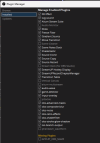
after doing all of this i thought to reinstall the last plugins i uninstalled / didnt need then i find a option in plugin manager called Applet_OBS_Name and cant remember what this is and im keep on thinking this the iusses im having, ive attached a screenshot of that list
 

Attachments

  • OBS-plugins.png
    OBS-plugins.png
    36.2 KB · Views: 16
You have too many plugins. Remove all but the ones you really need to use. Make sure all this plugins are updated and compatible with the OBS version you're using.
Same with scripts.
Enable Windows Game Mode as it do help.

Always remember in OBS less is more, specially on old computers / CPUs.
The Twitch test only do a test against Twitch servers, not other services. So if you see all good in it is only good for connections directly to Twitch, not for other services.
If you need to use dynamic bitrate then your connection isn't good or your computer can't manage the amount of data it needs to send.

This errors shows there's an issue on the network, and could be in your computer or anywhere between your computer and the server you're connecting to:
18:40:50.481: WriteN, RTMP send error 10038 (233 bytes)
18:40:50.481: WriteN, RTMP send error 10038 (42 bytes)
Check if the network driver is updated (on your MoBo support site), if the network cable is not broken, change the port where the cable connects into the router/modem, or may be an issue on the ISP specifically on the RTMP protocol.
Or it's simple too much load for an old CPU.
 
You have too many plugins. Remove all but the ones you really need to use. Make sure all this plugins are updated and compatible with the OBS version you're using.
Same with scripts.
Enable Windows Game Mode as it do help.

Always remember in OBS less is more, specially on old computers / CPUs.
The Twitch test only do a test against Twitch servers, not other services. So if you see all good in it is only good for connections directly to Twitch, not for other services.
If you need to use dynamic bitrate then your connection isn't good or your computer can't manage the amount of data it needs to send.

This errors shows there's an issue on the network, and could be in your computer or anywhere between your computer and the server you're connecting to:

Check if the network driver is updated (on your MoBo support site), if the network cable is not broken, change the port where the cable connects into the router/modem, or may be an issue on the ISP specifically on the RTMP protocol.
Or it's simple too much load for an old CPU.
thanks for your replay, for the plugins ive have instead all of them ive worked with for apast couple of years and had no iusees at all this started to happen only past few months which was random and my IP has check the connection over remotly and in person with an enginer out to check

will keep on disabling this plugins one by one to see what happens
 
Back
Top