Question / Help Connecting to Electronic Organ

Pr. Steveo

New Member
I would like to run audio from a Yamaha Clavinova CLP685b into a Youtube live stream presentation using OBS. I have downloaded the Yamaha Steinberg Driver and Cubase software. I have also connected the Yamaha to the laptop using a USB / AB cable, but so far haven't gotten the sound from the organ to come into the presentation. I have tried both, the Audio Output Capture and the Audio Input Capture, but no luck yet. Anyone successful in run a keyboard, etc thru OBS? Thanks! - Steveo
 
I'm keen to hear the answer too. I've been searching all day for one! :D My problem is a little different but I think the answer to yours may help.
 
It maybe the way you are setting up your DAW. Try ASIO and if that doesn't work MME/DirectX.

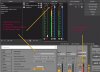
For example, I use Ableton Live with Focusrite MME/DirectX I feed all of audio I/O through a Focusrite Scarlett that flows through default Windows playback. OBS default playback correlates with whatever default Windows playback is set in the O/S. That is OBS Desktop Audio.

Its best to test your setup first by playing back, say an audio clip in the DAW to verify your setup is correct and OBS is capturing it. Then, deal with setting up any MIDI devices through the DAW.

Attached image maybe of help to get a sense of what I'm describing.
 

Attachments

  • ableton-focusrite-obs.jpg
    ableton-focusrite-obs.jpg
    150.1 KB · Views: 96
Last edited:
I've been able to successfully do this by avoiding my DAW (Nuendo) altogether. ASIO just doesn't work with OBS. My situation is a little different - I'm using a software-based keyboard in UVI's Falcon samples. I've set the audio driver to Windows WASAPI, and that works fine with OBS.
 
It maybe the way you are setting up your DAW. Try ASIO and if that doesn't work MME/DirectX.

For example, I use Ableton Live with Focusrite MME/DirectX I feed all of audio I/O through a Focusrite Scarlett that flows through default Windows playback. OBS default playback correlates with whatever default Windows playback is set in the O/S. That is OBS Desktop Audio.

Its best to test your setup first by playing back, say an audio clip in the DAW to verify your setup is correct and OBS is capturing it. Then, deal with setting up any MIDI devices through the DAW.

Attached image maybe of help to get a sense of what I'm describing.
Yeah sure, that allows you to bring the audio in but at a latency that is impossible to work with.
 
Back
Top