Hi all,
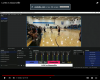
I can't seem to find the answer to this and I hope I'm not just overlooking it. I need to output a full screen clean signal derived from a droidcam input, to input into a Yolobox Pro for live streaming events. I had set the output to Fullscreen Projector Preview.....but I'm not sure that is the proper setting

Because when I went to the floor and broadcast back to the laptop, which is connected to the Yolobox Pro, this is what I actually broadcast:
I can't seem to find the answer to this and I hope I'm not just overlooking it. I need to output a full screen clean signal derived from a droidcam input, to input into a Yolobox Pro for live streaming events. I had set the output to Fullscreen Projector Preview.....but I'm not sure that is the proper setting
Because when I went to the floor and broadcast back to the laptop, which is connected to the Yolobox Pro, this is what I actually broadcast: