

Hi Guys. (sorry for my english)
This is my situation and my problem. I installed and configured OBS in local recording mode with SQ8 mini camera with microphone. Video recording are ok, but audio has interrupted. The situation is strange because in other programs for recording sound, recordings are ok - there is no interruption. (e.g. in a standard sound recorder in Windows 10)
SQ8 is connected via USB (on laptop), so i turned off internal laptop camera and microphone. So the default microphone is from SQ8.

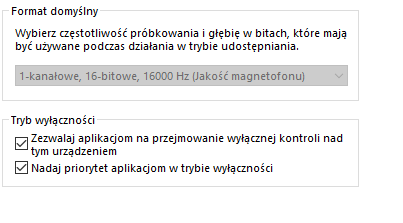
I turned off all effects on this microphone. Below its settings from the Windows level. As you can see, you can't set a format other than the one shown here.
(1-canal, 16bit, 16 Hz)
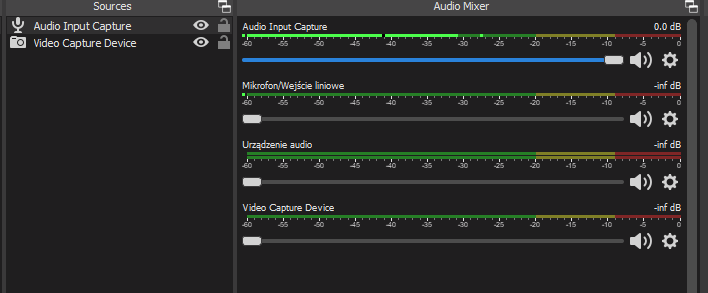
In OBS studio i added Video Capture Device, and Audio Input Capture (there are all from SQ8 camera)
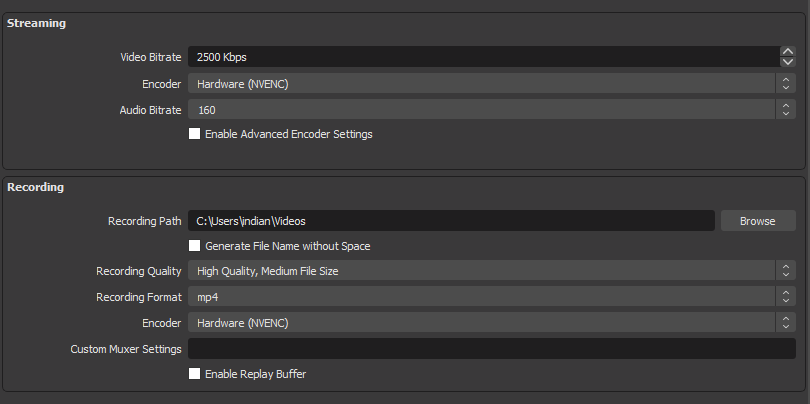
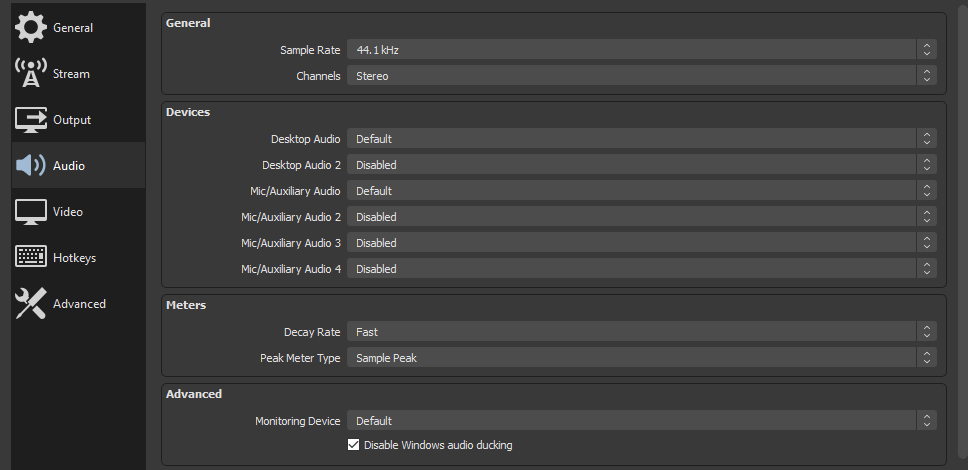
This is my additional settings from OBS :
This is my log file :
This is my situation and my problem. I installed and configured OBS in local recording mode with SQ8 mini camera with microphone. Video recording are ok, but audio has interrupted. The situation is strange because in other programs for recording sound, recordings are ok - there is no interruption. (e.g. in a standard sound recorder in Windows 10)
SQ8 is connected via USB (on laptop), so i turned off internal laptop camera and microphone. So the default microphone is from SQ8.
I turned off all effects on this microphone. Below its settings from the Windows level. As you can see, you can't set a format other than the one shown here.
(1-canal, 16bit, 16 Hz)
In OBS studio i added Video Capture Device, and Audio Input Capture (there are all from SQ8 camera)
This is my additional settings from OBS :
This is my log file :