
Capture card is marked inactive under audio mixer

jack413man

New Member
So a while back, i successfully setup my switch to be recorded via obs and capture card. However i recently got a new desk and i unplugged EVERYTHING so i dont even know where everything went outside the obvious. Anyways, it has been weeks since i used my switch and i didnt check obs to see if everything is working till yesterday.
I noticed that it did go through, video is working, but audio is not. I try to see videos and check setting and then i notice something, the "video capture device" a.k.a my switch, is marked inactive under audio mixer and no idea how to make it active. Today is same thing except the video source isnt detected as i dont see my switch gameplay. I plugged in my capture card and its powered. I plugged in my switch to the input.
However, i only ever played and watched the switch via obs and not through a monitor, so im not sure if or where i plug in my output cable. my capture card is this https://www.amazon.com/Klocaty-Capture-Nintendo-Streaming-Recording/dp/B09MJW32BC as i didnt want to overspend on something if im not gonna stream, only occasionally record my gameplay
Also it is an external as im not sure my pc supports internal and i dont want to go messing with that internal stuff.
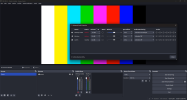
 

Attachments

  • Screenshot 2024-08-01 224303.png
    Screenshot 2024-08-01 224303.png
    89.8 KB · Views: 709
I am 70% sure this is because the audio input for the capture card is disabled in windows settings. if you go to settings>system>sounds>manage_sound_devices you will see all input and output devices both disabled and enabled. for me it was listed as "digital audio interface" but could be named something different. either way, all you need to do is enable it if its disabled and it should show up in OBS.

as for why the video suddenly disappeared I have absolutely no clue, sorry.

I really hope this is at least somewhat useful as I also had a problem with my audio being inactive and I only recently found out that it was my windows settings, but I did stumble across this post while I was searching for an answer, and I would've felt bad not replying if I had found something that could be useful.

(BTW the HDMI output for your capture card is just for passthrough, where the switch video would go to both OBS and a second monitor in case you wanted to play fullscreen and not have to look at OBS, so it's not required. the USB output is required and needs to be plugged into the computer)
 
I am 70% sure this is because the audio input for the capture card is disabled in windows settings. if you go to settings>system>sounds>manage_sound_devices you will see all input and output devices both disabled and enabled. for me it was listed as "digital audio interface" but could be named something different. either way, all you need to do is enable it if its disabled and it should show up in OBS.

as for why the video suddenly disappeared I have absolutely no clue, sorry.

I really hope this is at least somewhat useful as I also had a problem with my audio being inactive and I only recently found out that it was my windows settings, but I did stumble across this post while I was searching for an answer, and I would've felt bad not replying if I had found something that could be useful.

(BTW the HDMI output for your capture card is just for passthrough, where the switch video would go to both OBS and a second monitor in case you wanted to play fullscreen and not have to look at OBS, so it's not required. the USB output is required and needs to be plugged into the computer)
How would you go about doing this on a MacBook?
 
I am 70% sure this is because the audio input for the capture card is disabled in windows settings. if you go to settings>system>sounds>manage_sound_devices you will see all input and output devices both disabled and enabled. for me it was listed as "digital audio interface" but could be named something different. either way, all you need to do is enable it if its disabled and it should show up in OBS.

as for why the video suddenly disappeared I have absolutely no clue, sorry.

I really hope this is at least somewhat useful as I also had a problem with my audio being inactive and I only recently found out that it was my windows settings, but I did stumble across this post while I was searching for an answer, and I would've felt bad not replying if I had found something that could be useful.

(BTW the HDMI output for your capture card is just for passthrough, where the switch video would go to both OBS and a second monitor in case you wanted to play fullscreen and not have to look at OBS, so it's not required. the US

B output is required and needs to be plugged into the computer)
Thanks buddy. It was the PC settings that disabled my digital audio which is my OBS audio. Been wrestling with this for 3 weeks
 
I am 70% sure this is because the audio input for the capture card is disabled in windows settings. if you go to settings>system>sounds>manage_sound_devices you will see all input and output devices both disabled and enabled. for me it was listed as "digital audio interface" but could be named something different. either way, all you need to do is enable it if its disabled and it should show up in OBS.

as for why the video suddenly disappeared I have absolutely no clue, sorry.

I really hope this is at least somewhat useful as I also had a problem with my audio being inactive and I only recently found out that it was my windows settings, but I did stumble across this post while I was searching for an answer, and I would've felt bad not replying if I had found something that could be useful.

(BTW the HDMI output for your capture card is just for passthrough, where the switch video would go to both OBS and a second monitor in case you wanted to play fullscreen and not have to look at OBS, so it's not required. the USB output is required and needs to be plugged into the computer)
GOAT, I was so annoyed why i couldnt get audio, forgot i went and disabled everything abit ago
 
I came across this cause I'm having the same issues, but my obs still sets it as inactive after closing. My window settings are set for the card but obs still doesn't care and its making me scream. It'll register for mic/aux but for like a second before sound cuts and never come back.
 
I came across this cause I'm having the same issues, but my obs still sets it as inactive after closing. My window settings are set for the card but obs still doesn't care and its making me scream. It'll register for mic/aux but for like a second before sound cuts and never come back.
After some more fiddeling, Ive got it! (Updated my drivers seemed to help too) and I dont know if this is from an update or always, cause it did seem like it worked one day without this issue but a few days later this was an issue, for me; but it wont "activate" in preview mode (which is where I was having my issues...which is bonkers cause why CANT I preview my sound in preview mode to make sure things work??????) It activates in "program" mode, if youre in studio mode testing things (again which is where I was testing things the entire time) . Newbie user error fr. Its been bugging me for a long few days. (Edit to quote properly....maybe)
 
Back
Top