Capture card Audio related issue

leeran9

New Member
Hello.
This is a capture card audio related issue.

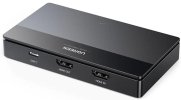
Product name: UGREEN HD Video Capture Card
Model name: CM630
Operating system: Linux Mint 21.3 Cinnamon 6.0.4
Linux kernel: 6.8.0-51-generic
OBS version: 30.2.3

I want to receive video and audio from the subcomputer through the capture board through the main computer OBS. However, the video comes out well without any problem, but the audio does not come out. I selected the product in the properties through audio input capture in OBS. When I check it with PulseAudio on the main computer, the product is recognized as an input device, but the audio does not come out.
Please help me.
 
Looks like the dirt-cheap deceptively-marketed barely-working junk strikes again.

Seems like these things must be the second most counterfeited thing in electronics, behind SD cards. Sometimes they work by accident, most of the time they partially work, and sometimes they just don't work at all.

If you want something that's guaranteed to work, look only at the name brands (because they actually care about customer loyalty, and thus have some real accountability), do some digging to see if they take Linux seriously (some of the big names roll their own hardware that requires a custom driver, and then don't write that driver for Linux), and expect to spend about $100 per input.

---

Also note, mostly for completeness here, that even with a good capture device, you still have a practical limit of one input per USB controller. That comes from the data rate that is required to make it good, and so it does actually apply per *controller* and not per port. That distinction is important when a lot of systems have internal hubs to connect all of their ports to a single controller. On those systems, you can only have one good USB input, total.

If you're lucky enough to have two controllers exposed to the outside, then you can have two good inputs, IF you're careful to have each one on a separate controller. Make sure you know which controller connects to which ports...
 
Last edited:
Check if your capture card is recognized with arecord -l and consider bypassing PulseAudio by using ALSA directly in OBS (e.g., hw:1,0). Ensure no other apps are using the audio stream by checking with fuser /dev/snd/*. You can also try increasing the audio buffer size in OBS to fix lag or dropouts. Make sure you have the latest drivers and firmware for your capture card, and if needed, use JACK Audio for more precise routing. Finally, check dmesg and OBS logs for any device-related errors.
 
I know this is an old thread, but circumstances have left me with a lot of time, a linux box and one of these UGREEN Cards.

The CM630 is an odd beast and I found it behaves best when the V4L side of pulseaudio/pipewire is disabled, I can't really find a consistent source on the best way to do that, but what helped was to ask chatgpt about how to do that.

why? to cut a long story very short, pulseaudio and by extension, pipewire, is a poorly developed audio stack created by an arrogant narcissist and bully who has been a significant voice in leading the charge on the encrapification of linux in the last decade, they're also responsible for systemd and avahi, if you've ever been tortured by these packages you'll know my pain, to be honest it only started to get bearable 5-6 years ago, until then I was an "ALSA or nothing" guy for linux because it generally... just... worked...

but anyway, because of this, pulseaudio and by extension, pipewire, has always had some weird quirks and stuff that never gets patched, I've switched off a load of stuff to get this working, usually overnight the UGREEN drops off, today I woke up and it's still working.

even if you're using pipewire, pulseaudio is underneath, if you disable V4L integration in the audio stack and just use V4L kernel capture directly and a regular separate audio cap via pipewire, it works a lot better.

pipewire/pulseaudio are randomly grabbing the v4l device and enumerating the audio devices on it or doing something or other that appears to be kicking the audio off, this seems to upset the ugreen card and kills audio for your conventional cap. v4l capture in pipewire/pulseaudio is at the wrong aspect ratio too, so no, using pipewire v4l is not a solution either. it's separate caps or nothing for this one.

A few of the changes I made that seemed to help, here as documentation of what MAY help, no guarantees, but it's some things to try:
I used "uvcvideo.quirks = 642" for the dongle in general.

Disabled v4l handling in pipewire/pulseaudio.

Disabled USB power suspend on the dongle.

Disabled automatic device assignment in pulseaudio and just for safekeeping I made and bound the default audio device settings to two null/fake pulseaudio devices, this stops any surprises and sudden blasts of audio our your monitors when streaming.

There will be a side effect of not being able to switch devices in pavucontrol, this is another policy in pulseaudio acting in an undesirable/useless way when the auto routing is switched off. it can also be disabled by settings for pulseaudio or its routing daemon just like automatic routing can be.

I construct my audio graph from shell scripts, pulseaudio/pipewire is a tool and should only do what it's told, not be everybody's mum, moss bros and teasy weasy, like lennart and distro packagers seem to want it to be. :|

i'm a grey bearded shell scripter who used to compile kernels for his '486, there's a chance I've actually licked this thing now, something about pulseaudio is not happy with it, so turning off v4l and the other stuff that is still in beta for OBS anyway, seems to just help keep it more stable and avoid any pulseaudio based policy surprises.

I've attached an image of the dongle so that people know which UGREEN cap dongle we're talking about since this thing often goes unlabelled on most online sources.
 

Attachments

  • UGREEN-M630-HD-Video-Capture-Card.jpg
    UGREEN-M630-HD-Video-Capture-Card.jpg
    32.2 KB · Views: 22
Last edited:
Just as a followup on the video side of things...

I have this working at 1080p 60fps, with YUYV4:2:2, Default Color range. it is VERY sensitive to changes to these settings, it's one of those dongles that once you get it working, don't fk with it.

Use Buffering, Use Autoreset on Timeout, get a clicking visual sync track from youtube and record it through your cap setup, use the difference between visual and audio track to sync up the audio track.

This is based on the same chip that most cap dongles are based on, the MacroSilicon MS2131, it can get a little toasty, mine had a thermal pad between the metal enclosure that's inside the plastic case and the chip, it's actually enough if you're like me and have some geek-related-hardware floating around, to replace that pad with an appropriate thickness copper shim with a tiny dot of thermal paste on each side, this will stop it overheating and should ease your frame drops as well. if you have any way of directing airflow at it that too will also help.

Aussies take note, because I know it gets up to 40c in the cities on some days easily, sometimes 45c and that will kill these dongles, you will be playing your game and when you view your VOD, half your frames will be dropped, not a good thing.

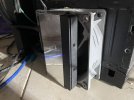
For some additional amusement/payoff for reading this far, see attached, my cooling setup for the dongle we're talking about, this thing's never overheating again. it's just what I had handy.
 

Attachments

  • photo_2026-01-05_19-21-58 - Copy.jpg
    photo_2026-01-05_19-21-58 - Copy.jpg
    200.6 KB · Views: 18
This dongle is definitely usable with the right configuration, considering you can get it for $30-$40 AUD, which is like $15 to $20 USD, it's a steal, if you have an old xeon or i7 or or even an early ryzen spare floating around, that plus an encode card and this cap dongle could make a nice cheap cap box for a lot of people.

I've had the cap running for at least a day now while I write code on another monitor and just checked in and it's been stabler than ever since I killed V4L in pipewire/pulse, It has me very suspicious of some automated feature in that new pulse/pipewire V4L stack that is poking the UGREEN whilst already engaged in OBS with V4L at the kernel level and with pipewire directly for audio, which just makes the UGREEN figuratively eat its own poo.


EDIT: OH CRAP, I forgot to mention this one because this thing is so touchy to config changes, there's a choice of Digital Or Analog Audio on the Audio Side of the UGREEN Dongle, it seems to work best in digital mode, I also set this in my setup scripts. always, always replug this dongle or manually toggle port power from a terminal if you're not sure if a config change applied.

Now I gotta get back to coding, I saw others struggling with the same hardware I picked up cheap last year so I thought I'd share all that I've learned about this thing, even I have had trouble with the audio until the last day or so.

+1 for another thing that probably wouldn't have happened with linux's sound stack if they weren't so fixated on politics over quality in deliverables the last decade.
 
Last edited:
@h4rm0n1c congrats on getting the device working!

Wanted to correct something in case it confuses other users and ask a follow up question...

pulseaudio and by extension, pipewire, is a poorly developed audio stack created by an arrogant narcissist and bully who has been a significant voice in leading the charge on the encrapification of linux in the last decade, they're also responsible for systemd and avahi
PipeWire was developed by Wim Taymans, who works at RedHat, but that's not the same person behind PulseAudio, systemd, etc. Yes, same company, but different (lead) developers. Taymans is also behind gstreamer.

even if you're using pipewire, pulseaudio is underneath
This is the wrong way around. On most of the latest distributions, PipeWire is the primary user-space media stream server, and it implements a PulseAudio server "on top" so that applications (which are still often tied to using PulseAudio) are still able to use PulseAudio.

Hence, when PipeWire picks up an audio device, it will pass on that info to its PulseAudio server (pipewire-pulse) - and then applications that use PulseAudio can see the device (in your case, the UGREEN audio).

PipeWire is competing with, and will hopefully supplant, PulseAudio in the long run.

I 100% agree it still needs a lot of work, particularly with video, and configuration is completely user-unfriendly (no one, aside from developers, want to fiddle with Lua scripts to manage setting up their audio - and I speak from experience: https://gitlab.com/stephematician/carla-wp-export)

if you disable V4L integration in the audio stack
Do you mean disable V4L2 from being monitored with PipeWire - i.e. switching off monitor.v4l2 in WirePlumber: https://pipewire.pages.freedesktop.org/wireplumber/daemon/configuration/features.html ? Just hoping to clarify for other users.

pipewire/pulseaudio are randomly grabbing the v4l device and enumerating the audio devices on it or doing something or other that appears to be kicking the audio off, this seems to upset the ugreen card and kills audio for your conventional cap
Hmm.

PipeWire can query loads of devices without invalidating the state. PipeWire shouldn't invalidate the state of the device just by opening it to check some properties via the V4L2 UAPI (this is explicit in the V4L2 UAPI). So while this could be a PipeWire "bug", this could equally be an issue with uvcvideo (if that's the module the device uses) and V4L2 in the kernel (not so likely the latter), or something upstream on the device itself (i.e. perhaps it is in someway not fully compliant with what uvcvideo and V4L2 expects).
 
PipeWire can query loads of devices without invalidating the state. PipeWire shouldn't invalidate the state of the device just by opening it to check some properties via the V4L2 UAPI (this is explicit in the V4L2 UAPI). So while this could be a PipeWire "bug", this could equally be an issue with uvcvideo (if that's the module the device uses) and V4L2 in the kernel (not so likely the latter), or something upstream on the device itself (i.e. perhaps it is in someway not fully compliant with what uvcvideo and V4L2 expects).
I wouldn't rule out the device itself either. Like I said above:
Seems like these things must be the second most counterfeited thing in electronics, behind SD cards. Sometimes they work by accident, most of the time they partially work, and sometimes they just don't work at all.
It could be that a query that is supposed to be independent of everything else, gets this cheap device that nobody cares about (not even the manufacturer) into a weird state that no longer does its intended function. Not giving it the query does indeed work, but it can be difficult to guarantee that nothing in a complex system triggers that query, especially when it's supposed to be innocuous.

It sounds like @h4rm0n1c has found a way to simplify the system so that it *can* be guaranteed to not do that (or at least be much less likely to), at the expense of a lot of ease of use. If you're willing to do that to save $100 on a name brand card, then go right ahead! (not everyone can get over the sticker shock, but they *can* play with things for free...)
 
@h4rm0n1c congrats on getting the device working!

Wanted to correct something in case it confuses other users and ask a follow up question...


PipeWire was developed by Wim Taymans, who works at RedHat, but that's not the same person behind PulseAudio, systemd, etc. Yes, same company, but different (lead) developers. Taymans is also behind gstreamer.


This is the wrong way around. On most of the latest distributions, PipeWire is the primary user-space media stream server, and it implements a PulseAudio server "on top" so that applications (which are still often tied to using PulseAudio) are still able to use PulseAudio.

Hence, when PipeWire picks up an audio device, it will pass on that info to its PulseAudio server (pipewire-pulse) - and then applications that use PulseAudio can see the device (in your case, the UGREEN audio).

PipeWire is competing with, and will hopefully supplant, PulseAudio in the long run.

I 100% agree it still needs a lot of work, particularly with video, and configuration is completely user-unfriendly (no one, aside from developers, want to fiddle with Lua scripts to manage setting up their audio - and I speak from experience: https://gitlab.com/stephematician/carla-wp-export)


Do you mean disable V4L2 from being monitored with PipeWire - i.e. switching off monitor.v4l2 in WirePlumber: https://pipewire.pages.freedesktop.org/wireplumber/daemon/configuration/features.html ? Just hoping to clarify for other users.


Hmm.

PipeWire can query loads of devices without invalidating the state. PipeWire shouldn't invalidate the state of the device just by opening it to check some properties via the V4L2 UAPI (this is explicit in the V4L2 UAPI). So while this could be a PipeWire "bug", this could equally be an issue with uvcvideo (if that's the module the device uses) and V4L2 in the kernel (not so likely the latter), or something upstream on the device itself (i.e. perhaps it is in someway not fully compliant with what uvcvideo and V4L2 expects).
Thanks, sorry, I turned the WHOLE v4l part of pipewire off I disabled the monitor in LUA, I don't really have the details easily retrievable at this point in time, it's more meant as a general guide to what I did and just the fact that I know that pulse has left a legacy of weird behavior in the audio stack and that if they want to expand scope to add video, there's just gonna be more bugs, my issue is that even if it's a new project it's still inherited all the same issues and they're still not fixed. even a set of "pro" defaults that you can choose in a linux installer that just has all this stupid experimental "be your audio stack's mum/windows wannabe" stuff switched off.

that's what I mean by it's still pulseaudio underneath. the bad behavior both in code and from the developer has still been allowed to prevail as the policy for the inheriting package, poisoned fruit, not sins of the father.

Edit, Got it:

mkdir -p ~/.config/wireplumber/wireplumber.conf.d

cat > ~/.config/wireplumber/wireplumber.conf.d/90-disable-v4l2.conf <<'EOF'
wireplumber.profiles = {
main = {
monitor.v4l2 = disabled
monitor.libcamera = disabled
}
}
EOF

I turned the whole thing off, dead, blasted, gone, no cameralib, no monitor.


redhat's boned btw, they can't leverage support contracts when there's managers everywhere who can see the cost benefit of a mid level engineer inhouse with access to a decent LLM model full of documentation that's been built the same way corporations build mass deployed tech based tools for internal use for decades now.
 
Back
Top