Question / Help Can't "Paste Duplicate" Video Source

seethesun

New Member
Hi,

I am new to OBS. I have two scenes set up and wanted to use my webcam in both scenes. I found a video online showing where they did it by copying the webcam source in scene 1 and and "paste duplicate" to the second scene. However, I tried it and the paste duplicate option is grayed out (paste reference isn't).

I tried searching, and found a couple of instances of people with the same issue, but no solution (at least that I understood).

I also tried adding a new video source and existing source, but the video wouldn't show.

If it matters, I tried it on 23.1.0 and the most updated version.

Any thoughts?

Thanks.
 
You can import scenes in to other scenes
Unbenannt 1.png
 
You should use paste reference with video sources, not paste duplicate.

Pasting a video source as a duplicate would allow you to independently change settings, but if you did so, altering one source would cause the other to stop functioning.

Pasting as a reference ensures both sources use the same settings.
 
But that stupid to not allow people to paste as duplicate. What if we need the same preconfigured media source but with different media and keep the last one also?
That's for sure, OBS has a lot of unsolved problems... but not because they can't figure out what to do, maybe that Xsplit sponsorship agreement...
Every, like must-to-have, function isn't added for years
 
I spent the last few months on my MAC with obs, and could do this with most video sources. (except black magic) now that ive made the move to PC, i cannot, i can also NOT add a 2nd iteration of the video sources manually.

so, how does one use this why is it needed?

example.
on scene one i have a small iteration of my dslr, using a matte filter to give the corners of the display rounded edges.
on the away from game/chat/intermission scene, the dslr is 3/4 of the scene and fits in a nice 16/9 bounding box, so I don't want
the rounded corners. I had no problem doing this on my mac, and cpu/gpu was never a concern, more so now that im barely cracking 5% cpu.

so, am i missing something here, a setting perhaps. or is something in the architecture of Pc vs Mac video decoding???
 
For those who want to duplicate a source (keeping the same sizes and constraints of the first source but not referencing it),

1. Make another source of the same time
2. Right click the first source and go to Transform. Click on copy Transform
3. Right click the second source and go to Transform. Click on pastTransform

Now you have two sources with the same exact constrains
I hope this has helped
 
Hi, I need to create 16 video sources and would like to be able to create the first then paste 16 duplicates and modify each accordingly.
Since Paste duplicate is disabled for video sources I cannot. One alternative might be to paste reference but then "break the reference to create a duplicate. Otherwise, please allow paste duplicate for video sources also. Many thanks, Michael
 
Is the idea we create one scene with one video source, then duplicate the scene? Or reimport the same scene into itself for each new video source? What happens to the name of the video source, does it remain a duplicate?
 
I'm really just looking to have two copies of the video in a scene, one with different settings. Trying to make a tile that magnifies the health bar in a game. Is there anyway to do this?
 
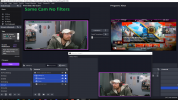
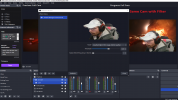
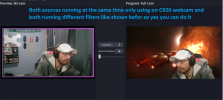
to make a second camera or media source with with different fitlers

al you have to do is just add the normal source Not a NS-Scene

when you have this done for example a camera turn this camera source in go a group by it self then apply the filter to the group not the camera and there you go
 

Attachments

  • no filters.png
    no filters.png
    687.5 KB · Views: 371
  • With Filters.png
    With Filters.png
    472.5 KB · Views: 348
  • two cams.png
    two cams.png
    803.7 KB · Views: 353
Yeah, I have 2 video sources in my scene, one of them is set up incorrectly as a playlist, which causes a stutter at the loop point, and the other is a single looping video that DOESN'T stutter. I want to DUPLICATE the one that doesn't stutter and simply change the source, instead of having to figure out what I did. I CANNOT do that with paste (Reference). PLEASE fix this. I don't even understand WHY it would be disabled in the first place.
 
Yes, indeed this is stupid. For example, I want another source that differs just scale filtering and some filters. So I just going to waste my time to complete basically the same thing - I need to create new source, then copy transforms, then copy all the checkboxes one by one, then shoose the "window" that I need by hand. And only AFTER of all of this I am gonna get a DUPLICATE.
To everyone's wandering: I am NOT USING TWO SOURCES AT THE SAME TIME, I am just switching them on and off when I need to do so, leaving JUST ONE. This is a question about convenience, not functionality. It is bad UIX.
 
Last edited:
Thanks for discussing this issue! As someone who manages Basketball Stars Unblocked and frequently uses OBS for game recordings, I've found a workaround that might help: create a new source, then use Transform > Copy Transform from the original source and paste it to the new one. This maintains the same positioning and size while allowing different filter settings. For those interested in seeing how we implement this in game recording setups, you can check out our basketball gaming content. Hope this helps others facing similar challenges!
 
I'm menaging some RTSP streams coming from an NVR, it can be so cool for me to duplicate the first camera and just change the channel number for the second camera, I can't paste a duplicate, paste refernce change parameters to the first one too, this is really unwelcome. I need to create 15 new sources and paste there manually all parameters, this is so stupid
 
Back
Top