Question / Help Cannot stream 1080p@60

fsimon

New Member
Hey guys,

I'm having problems streaming 1080p at 60 fps..
Now I realize that this is a pretty demanding thing to do, but I theoretically 'should' have the resources to pull it off or at least be on the limit.

I'm streaming Heroes of the Storm, and since that uses the old SC2 engine, it runs on a single thread.. Now I solved the thread capping problem and the encoder not being able to pull the frames when that one thread caps by limiting the fps to 60 so that part works now, the game part is okay.

But this also means I pretty much have 15 threads that can be freely used by OBS.. since I'm running a Ryzen 1700x overclocked to 3.8 ghz. However whenever I try to stream in 1080p at 60 fps the stream is like a slideshow and I get the encoder being capped message at the bottom of OBS, even though my overall CPU usage never gets past 30% and I have threads simply idling around.

I tried using the threads=x (tried multiple options.. 8, 12, 14.. it's all the same), but I still get the same result.. some threads are idling.. overall usage is around 30% and the stream runs like a slideshow..

Any advice welcomed.

Thanks!
 
Your system can't keep up with the x264 preset you selected.
Yes, that part was obvious.. (also, I read the log too...)the question is WHY?.. as when that's happening I'm at 30% CPU usage and I have threads idling regardless of the number in the threads parameter I give the encoder.. about 5 threads are capping and the rest are idle.. So it's not the 'system cannot keep up with the preset'... but the 'software is not utilizing my system even to half of its potential'.
 
Lower your CPU preset to very fast/faster. Downscale filter can be bicubic or Lanczos, your choice.

I own an overclocked Ryzen 7 1700, these processors cannot handle more than CPU preset set at very fast/faster at 1080p/60FPS, depending on the software being captured.

You could also try to set affinity on your task manager to reserve cores 0-7 to OBS and cores 8-15 to everything else so there's no CCX latency issues.
 
Lower your CPU preset to very fast/faster. Downscale filter can be bicubic or Lanczos, your choice.

I own an overclocked Ryzen 7 1700, these processors cannot handle more than CPU preset set at very fast/faster at 1080p/60FPS, depending on the software being captured.

You could also try to set affinity on your task manager to reserve cores 0-7 to OBS and cores 8-15 to everything else so there's no CCX latency issues.
It was on fast in the log I posted and skipped 23% of the frames.. and I also tried faster, made little to no difference. On medium it skips 75%.
So to recap, my problem is that OBS isn't utilizing my CPU threads.. it uses about 5 of 16.. the rest is close to idle. Now if it was using my CPU close to 80% at least.. or showing any signs of processing power shortage (like less responsive multitasking, etc) and THEN skipped frames.. I'd totally accept the 'Your system can't keep up with the preset' answer, but currently to me this looks like some sort of bug / setting where the encoder is totally ignoring what I tell it with the 'threads' parameter and tries to squeeze everything into 4-5 threads. So I'm looking for things along the lines of advanced encoder parameter tweaks.. etc.. instead of the 'it's not good enough'.
Keep in mind that the game I'm trying to stream isn't on par with the new resource intensive games, so the hit from that is almost close to non-existent (a mere 6-7% CPU usage when running the game alone) and most people who use dual PC setups have way worse streaming PCs than what's left of mine after you take away the resources used by the game, yet have no issues with 1080p@60, even on medium profiles.. The fact that your Ryzen 1700 can't handle a lower preset than fast makes me think it might be some Ryzen specific issue with OBS.. maybe check your CPU activity per core when streaming.. see if you get something similar than I do.. with 5 threads capped and the rest idle..

Cheers!
 
I can record more intensive games than HOTS at 1080p/60FPS just fine with the settings used on my previous comment, with a 3.4GHz overclock and 2933Mhz memory. OBS works just fine.

The couple games where I still had issues were sorted out by simply changing affinity settings, as mentioned previously.
 
I can record more intensive games than HOTS at 1080p/60FPS just fine with the settings used on my previous comment, with a 3.4GHz overclock and 2933Mhz memory. OBS works just fine.

The couple games where I still had issues were sorted out by simply changing affinity settings, as mentioned previously.
That was actually the first thing I tried, before ever trying to use the threads param. Since the game only uses one thread.. I set the game to a tread and I unchecked that as well as it's counterpart on the same core for OBS.. Unfortunately it didn't do anything.. that's why it's a bit strange, something's not right here.
Oh well.. I'll keep experimenting tomorrow..
 
FWIW my 2700x can just barely do 1080p60 Medium , it can do 720p60 Slow no problem using PUBG as my benchmark. Your ram speed plays a huge part in the performance of the CPU in x264.

Your OBS CPU usage should be closer to 50-60% during high motion @ 1080p60, something is causing your CPU to not be fully utilized correctly. When I encode every thread is used, I don't limit my thread count in x264 or dick around with affinities.
 
Today I changed a single setting, in the Advanced tab I set the process priority to High and I can stream pretty flawlessly in 1080p at 60 fps.. so it was definitely something not giving enough CPU to OBS.
I tried it on the faster preset again and it's working well and I only have a 10% CPU usage for OBS and overall something like 30%..
It's strange that this option alone is appearing to 'fix' the issue.. windows should have way better load balancing at this point... I'll keep experimenting, maybe it can do one preset lower as well..
Thanks

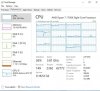
Edit: actually... that was the veryfast preset that 'worked' but even there I only see activity on 5 threads.. but it does work and with a bitrate of 6k it looks 'decent'.. However I'm still not sure what's happening.. it's supposed to work at least on the 'faster' one imo.. even based on the examples you guys provided with Ryzens.. Here's a picture of what I get when streaming on veryfast 6k bitrate and 1080p 60 fps. I have the threads parameter set to 12 atm
One of those threads is the game.. so I'm assuming OBS is using the other 4. Also OBS on the bottom reports a usage of 10%, that's why I'm sort of assuming it should be able to do one preset lower at least.. since CPU usage should kinda... double with each step.
 

Attachments

  • Streaming CPU Usage.jpg
    Streaming CPU Usage.jpg
    46.7 KB · Views: 105
Last edited:
Here's an update... maybe someone can find some legit explanation for it :)

So after a lot more troubleshooting... I figured out that if OBS has access to any of my first 4 threads.. it will only use those and nothing else..
However if set the affinity and disable the first 4 threads (0-3), then it will suddenly start using all the rest and balancing the load properly... This way I can actually stream even on the medium profile without any issue..
It's really weird.. why would having access to any of my first 4 threads cause it to ignore all the rest?

So yea, basically the workaround is to uncheck the affinity of the first 4 threads for OBS.. however it would be nice to know the technical reason behind it, even afterwards if I re-enable any of the first 4... the encoding instantly overloads and usage jumps back to only the selected ones from the first 4...

Glad I'm able to stream now though... maybe it actually is some kind of weird OBS issue and it can be fixed in some future patch so I don't have to use affinity settings every time..

Cheers!
 
Back
Top