RGMG
New Member
Hi guys,
I'm running a Dell Laptop (Dell XPS 15 | 9506) and have used OBS screen recording in the past without issue. However, recently it's STOPPED working for me. Have gone through several tutorial videos trying to fix but no resolution. Yes, have also read the 'sticky' post in the forum here about laptops. Tried updating the NVIDIA card to "INTEGRATED GRAPHICS", but that did not resolve.
Also UNINSTALLED/REINSTALLED OBS but still no resolution.
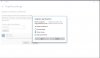
Here is the most recent log file from OBS....any help is appreciated. Also, for some reason when I'm in OBS, and go to HELP, CHECK FOR UPDATES I'm seeing the error message I've attached but can't find anything running that might be causing this.
I'm running a Dell Laptop (Dell XPS 15 | 9506) and have used OBS screen recording in the past without issue. However, recently it's STOPPED working for me. Have gone through several tutorial videos trying to fix but no resolution. Yes, have also read the 'sticky' post in the forum here about laptops. Tried updating the NVIDIA card to "INTEGRATED GRAPHICS", but that did not resolve.
Also UNINSTALLED/REINSTALLED OBS but still no resolution.
Here is the most recent log file from OBS....any help is appreciated. Also, for some reason when I'm in OBS, and go to HELP, CHECK FOR UPDATES I'm seeing the error message I've attached but can't find anything running that might be causing this.