Question / Help Bitrate tanks after 1 hour of streaming perfectly fine. HELP!

18:36:38.135: Output 'adv_stream': Number of lagged frames due to rendering lag/stalls: 4495 (1.9%)

GPU overload.

GPU Overload Issues

18:36:38.135: Output 'adv_stream': Number of dropped frames due to insufficient bandwidth/connection stalls: 5106 (2.2%)

Network issue.

Dropped Frames/Connection Issues

Connection cannot sustain selected bitrate. Generic speedtest results not relevant to streaming performance. Use TwitchTest instead.

 
Since there is a -2% reading on both encoding lag and rendering lag (i.e. its balanced but poorly), OBS isn't getting enough Windows scheduling time to do its work. Try giving OBS more process priority than your game by going into OBS Advanced and Process Priority and set it to Above Normal Priority. This, assuming there is nothing else running in your system that is taking up a a lot of CPU usage other than these two.

If that doesn't work, you can also go into Task Manager and get down and dirty by setting affinities. More cores/threads for OBS, and less cores/threads for your game. But that is a pain in the ass to have to do that every time you stream.

If all that doesn't work, then use hardware encoding to get rid of the software encoding load put on the CPU by x264. Go download GeForce Expererience and update your Nvidia drivers. Then, in OBS use NVENC new instead of x264.

Your i7-8700K is a very good CPU for doing high clock frequency gaming resulting in really good FPS. However, its only a 6 core/12 threaded CPU. When you run x264 on your system, it defaults to taking up 9 threads for a 6 core/12 thread system. That means, there are only 2 cores available to handle your game, the operating system, and all other services and applications you have running. By using NVENC, you get get back those cores/threads making your system run smoother. So if your game can run on more cores or you want to run more applications and services, you will be able to do so while you stream without thread switching delays.

Also, since this is a "K" processor it can be overclocked. If you are overclocking, change your thinking. Of utmost importance is making your system stable. Monitor your system to determine if the processor is thermal throttling or power limiting because that too can cause sudden bitrate spikes and drops.

 
Since there is a -2% reading on both encoding lag and rendering lag (i.e. its balanced but poorly), OBS isn't getting enough Windows scheduling time to do its work. Try giving OBS more process priority than your game by going into OBS Advanced and Process Priority and set it to Above Normal Priority. This, assuming there is nothing else running in your system that is taking up a a lot of CPU usage other than these two.

If that doesn't work, you can also go into Task Manager and get down and dirty by setting affinities. More cores/threads for OBS, and less cores/threads for your game. But that is a pain in the ass to have to do that every time you stream.

If all that doesn't work, then use hardware encoding to get rid of the software encoding load put on the CPU by x264. Go download GeForce Expererience and update your Nvidia drivers. Then, in OBS use NVENC new instead of x264.

Your i7-8700K is a very good CPU for doing high clock frequency gaming resulting in really good FPS. However, its only a 6 core/12 threaded CPU. When you run x264 on your system, it defaults to taking up 9 threads for a 6 core/12 thread system. That means, there are only 2 cores available to handle your game, the operating system, and all other services and applications you have running. By using NVENC, you get get back those cores/threads making your system run smoother. So if your game can run on more cores or you want to run more applications and services, you will be able to do so while you stream without thread switching delays.

Also, since this is a "K" processor it can be overclocked. If you are overclocking, change your thinking. Of utmost importance is making your system stable. Monitor your system to determine if the processor is thermal throttling or power limiting because that too can cause sudden bitrate spikes and drops.
Thanks a lot for your lengthy response. I will definitely make some changes! :) And ill let you know how it goes
 
18:36:38.135: Output 'adv_stream': Number of lagged frames due to rendering lag/stalls: 4495 (1.9%)

GPU overload.

GPU Overload Issues

18:36:38.135: Output 'adv_stream': Number of dropped frames due to insufficient bandwidth/connection stalls: 5106 (2.2%)

Network issue.

Dropped Frames/Connection Issues

Connection cannot sustain selected bitrate. Generic speedtest results not relevant to streaming performance. Use TwitchTest instead.

Thank you will try to change some things around

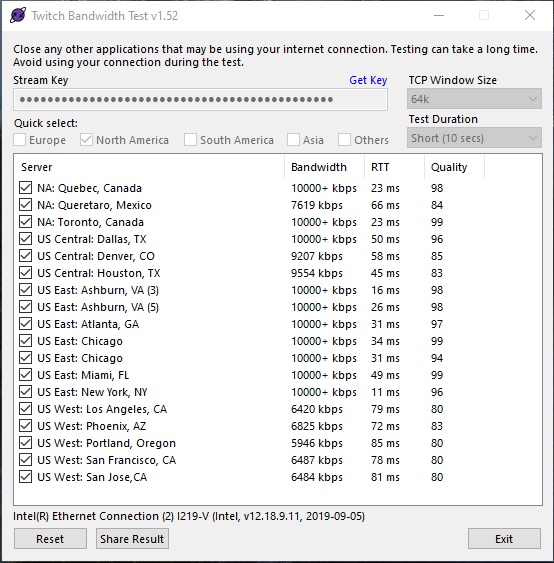
these were my results for the twitch bandwidth test

How would I choose the best server?
 
Sort the list by quality. Pick the one that has the combination of highest quality and highest bandwidth.
 
Back
Top