
Base canvas goes wrong completely

beardedfillet

New Member
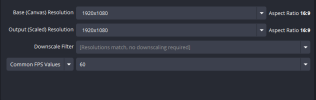
So I am trying to use the base canvas as 1920x1080p, However when i do everything then goes huge and the transform box is only useable half way up the screen where i can move items around from the box, Im not sure what i have really done to be honest!, But i really don't want to uninstall and start again, for clarity this is just the one source, Its then nested into my "stream" scene,


sorry bout the junk pictures, I had to reshrink them, I think it would of just been easier to link them LOL! but anyway hope this helps get to the bottom of this :)
 

Attachments

  • issue 1.png
    issue 1.png
    10.7 KB · Views: 8
  • issue 2.jpg
    issue 2.jpg
    33.2 KB · Views: 7
So I am trying to use the base canvas as 1920x1080p, However when i do everything then goes huge and the transform box is only useable half way up the screen where i can move items around from the box, Im not sure what i have really done to be honest!, But i really don't want to uninstall and start again, for clarity this is just the one source, Its then nested into my "stream" scene,


sorry bout the junk pictures, I had to reshrink them, I think it would of just been easier to link them LOL! but anyway hope this helps get to the bottom of this :)
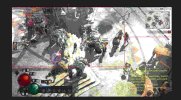
https://files.catbox.moe/sxghkf.png This is the second picture from the original i just had to upload it properly :) sorryy for the rubbish one
 
Base resolution should be the same size of the main monitor. Then you can change the output resolution to whatever resolution you want to output.
Then you can use Ctrl+R on the source you want to reset its size.
 
yeah that didn't seem to fix it, Its that red box that just wont cover the entire picture, Not sure why? i guess it serves me right from moving stuff around the other day hehe
 
The red box is a source. If the source is only 1080, then there's the issue. You need to double check what you add and the size of it. In between the filters you added there's one that scale to 1080p, so if the canvas is in 1440p or higher you'll get this result.
 
I'm relatively new, but still managed to get my hands firmly behind the basics (I think!). Anyway, I briefly came across the same issue.

OP => Am I right to assume that your source is an application window vs. an entire screen/monitor? Because if so then that's probably your issue, especially if the application window isn't full screen. Because then it's OBS which basically needs to resize stuff. What worked for me was to either change my game window to full screen, or just accept the fact that it didn't fully fill the preview (you can somewhat easily resize & reposition the red outline).

In addition: maybe lock your source (using the small lock icon?) because then you'll prevent accidental drags and repositions.

Hope this could help!
 
I'm relatively new, but still managed to get my hands firmly behind the basics (I think!). Anyway, I briefly came across the same issue.

OP => Am I right to assume that your source is an application window vs. an entire screen/monitor? Because if so then that's probably your issue, especially if the application window isn't full screen. Because then it's OBS which basically needs to resize stuff. What worked for me was to either change my game window to full screen, or just accept the fact that it didn't fully fill the preview (you can somewhat easily resize & reposition the red outline).

In addition: maybe lock your source (using the small lock icon?) because then you'll prevent accidental drags and repositions.

Hope this could help!
So that source is straight from my hd60x, i use my tv to play whilst watching that, sadly the only way i figured to swap this around is live with it and resize, however i can't crop with alt as it doesn't go green instead it looks like im resizing that lol
 
Back
Top