Bad Pixelation/Blur when moving...I've tried everything that I know to try :(

40sgamingdad

New Member
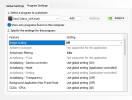
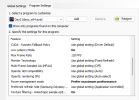
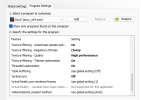
Any help would be greatly appreciated as I am at my wits end. Before we begin I just want to list the things I have already tried so that the responses can be targeted towards a good solution if there is one.

Background - I stream to youtube currently. I only stream Dayz which is a notoriously difficult game to get a good quality image in due to the foilage etc. but my stream looks significantly worse than ones I have watched from both big and small creators

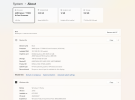
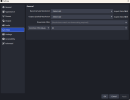
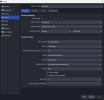
Links below have all of my specs and current settings + Logs

Other little notes...

GSYNC is off
HDR is off
Fiber Internet (Upload Speed 35mbps)
I use NVIDIA filters and have been messing around with OBS filters under Game Capture as well to help image quality
 

Attachments

  • Screenshot (87).png
    Screenshot (87).png
    27 KB · Views: 27
  • Screenshot (88).png
    Screenshot (88).png
    26.9 KB · Views: 23
  • Screenshot (90).png
    Screenshot (90).png
    136.9 KB · Views: 26
  • Screenshot (89).png
    Screenshot (89).png
    25.9 KB · Views: 22
  • Screenshot (91).png
    Screenshot (91).png
    30.9 KB · Views: 22
  • Screenshot (92).png
    Screenshot (92).png
    57.8 KB · Views: 25
  • Log Files.txt
    Log Files.txt
    17.7 KB · Views: 18
  • Log Files (2).txt
    Log Files (2).txt
    17.7 KB · Views: 14
Plenty wrong in there but neither log contains a encoding session.

Anyway, your configuration is incorrect, the HP monitor should be connected to your 5070 just like the Odyssey is.

21:26:21.417: Adapter 1: AMD Radeon(TM) Graphics
21:26:21.417: Dedicated VRAM: 509358080 (0.5 GiB)
21:26:21.417: Shared VRAM: 16731836416 (15.6 GiB)
21:26:21.417: PCI ID: 1002:164e
21:26:21.417: HAGS Status: Disabled (Default: No, Driver status: Unsupported)
21:26:21.417: Driver Version: 32.0.21043.5001
21:26:21.418: output 0:
21:26:21.418: name=HP E243
21:26:21.418: pos={2560, 0}
21:26:21.418: size={1080, 1920}
21:26:21.418: attached=true
21:26:21.418: refresh=59
21:26:21.418: bits_per_color=8
21:26:21.418: space=RGB_FULL_G22_NONE_P709
21:26:21.418: primaries=[r=(0.638672, 0.357422), g=(0.308594, 0.637695), b=(0.152344, 0.069336), wp=(0.313477, 0.329102)]
21:26:21.418: relative_gamut_area=[709=1.032556, P3=0.761170, 2020=0.546089]
21:26:21.418: sdr_white_nits=80
21:26:21.418: nit_range=[min=0.500000, max=270.000000, max_full_frame=270.000000]
21:26:21.418: dpi=96 (100%)
21:26:21.418: id=\\?\DISPLAY#HPN3469#5&2ed403e6&0&UID260#{e6f07b5f-ee97-4a90-b076-33f57bf4eaa7}
21:26:21.418: alt_id=\\.\DISPLAY5
 
After looking at the benchmarks for the 7700X, your set-up is slightly less powerful than my 12900k/3090. Our systems are very close overall & should perform roughly the same. Based on my testing, I think you'll get the best performance out of OBS running that Odyssey @ 120HZ.
 
After looking at the benchmarks for the 7700X, your set-up is slightly less powerful than my 12900k/3090. Our systems are very close overall & should perform roughly the same. Based on my testing, I think you'll get the best performance out of OBS running that Odyssey @ 120HZ.
Yea I have it set to 120hz for the game specifically. Do you mean turning it down to 120hz for the monitor all together?
 
Plenty wrong in there but neither log contains a encoding session.

Anyway, your configuration is incorrect, the HP monitor should be connected to your 5070 just like the Odyssey is.

21:26:21.417: Adapter 1: AMD Radeon(TM) Graphics
21:26:21.417: Dedicated VRAM: 509358080 (0.5 GiB)
21:26:21.417: Shared VRAM: 16731836416 (15.6 GiB)
21:26:21.417: PCI ID: 1002:164e
21:26:21.417: HAGS Status: Disabled (Default: No, Driver status: Unsupported)
21:26:21.417: Driver Version: 32.0.21043.5001
21:26:21.418: output 0:
21:26:21.418: name=HP E243
21:26:21.418: pos={2560, 0}
21:26:21.418: size={1080, 1920}
21:26:21.418: attached=true
21:26:21.418: refresh=59
21:26:21.418: bits_per_color=8
21:26:21.418: space=RGB_FULL_G22_NONE_P709
21:26:21.418: primaries=[r=(0.638672, 0.357422), g=(0.308594, 0.637695), b=(0.152344, 0.069336), wp=(0.313477, 0.329102)]
21:26:21.418: relative_gamut_area=[709=1.032556, P3=0.761170, 2020=0.546089]
21:26:21.418: sdr_white_nits=80
21:26:21.418: nit_range=[min=0.500000, max=270.000000, max_full_frame=270.000000]
21:26:21.418: dpi=96 (100%)
21:26:21.418: id=\\?\DISPLAY#HPN3469#5&2ed403e6&0&UID260#{e6f07b5f-ee97-4a90-b076-33f57bf4eaa7}
21:26:21.418: alt_id=\\.\DISPLAY5
That’s odd that the 2nd monitor is not plugged into the GPU. It’s definitely in the correct outlet for it. I’m not insanely computer savvy so not sure what’s going on there. You mentioned “plenty wrong” would you mind expanding? Thanks!
 
No, there's no reason for me to waste anymore of my time in this thread until your configuration is corrected.
Configuration is correct now having said that….I read through some of your posts and you Your help is not needed nor is it welcome in this thread any longer. I don’t have time to waste on dorks who get their rocks off on a fake superiority complex they’ve built in tech help forums. Next time do everyone a favor and just don’t respond at all. You can be right about something and still be incredibly unhelpful. Probably why you spend most of your time in forums bc in real life you’d get your ass beat.
 
It's called experience and knowledge, clearly something you are lacking with OBS. I've been using OBS for 11 years now. 8 of those years have been flawless. You can't even get a recording, Good Luck tough guy.....
 
Back
Top