Bad File Path

dennismbowman

New Member
All of a sudden I cannot record. I keep getting a Bad File Path alert. Below is the current log file of the incident.


I removed the program from my computer and then reinstalled it, but it came back with all the original settings.

Thanks to anyone who has an idea of how I can fix this problem.

Dennis
OBS Bad File Path.jpg
 
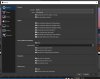
Thanks for your reply. I don't seem to see anything that Recordings in the Settings>Output (see attached screen capture).

That is where I first checked, but when I saw that nothing was checked, I figured this area wasn't the problem.
 

Attachments

  • Settings-Output.jpg
    Settings-Output.jpg
    122 KB · Views: 44
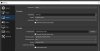
At that screen you now have General selected, please go to Output at the left. Then go to tab Recording. There you'll find Recording Path.
Does the folder specified there still exist?

If you want to delete OBS Studio and also delete the profile (settings), scene collection etc. to start completely blank from factory settings, go to %APPDATA% and delete the obs-studio subfolder.
 
Last edited:
Thank you so much for this great information!!!!!

That was the problem. The folder I had been using was moved off of my desktop.

YeeHahhh. I'm back in the game baby!!!!

Thanks again!!!

Dennis
 

Attachments

  • Recording Path.jpg
    Recording Path.jpg
    74 KB · Views: 43
Back
Top